
Basics: processor, microcontroller and development board
Arduino and ESP32 boards are development boards: ready-made circuit boards built around a microcontroller chip, so you can program and test the chip without designing your own circuit.
The name "Arduino" belongs to the board; the chip on it (the ATmega328P on the Uno) is the microcontroller. Likewise an ESP32 DevKit is the board and the ESP32 is the chip. A laptop's processor is only the "thinking" part and needs separate memory, storage and an operating system. Every project then follows one loop: sense (read a button or sensor), think (your code decides) and act (drive an LED, buzzer or motor).
| Microprocessor | Microcontroller | Development board | |
|---|---|---|---|
| What it is | Only the CPU (processing core) | CPU, memory and I/O pins together on one chip | A microcontroller on a circuit board with support parts |
| Needs around it | RAM, storage, I/O chips, an operating system | Little: power, a clock and your program | A USB cable and a computer |
| Examples | Intel Core i5 in a laptop | ATmega328P, ESP32 chip | Arduino Uno, ESP32 DevKit |
| Runs and used for | An OS and many apps: PCs, phones, servers | One program, forever: washing machines, remotes, sensors | The program you upload: learning and prototyping |
Why a development board?
The bare chip is tiny and fiddly. The board adds everything you need to start in minutes:
- USB socket and bootloader: upload code with a cable, no separate programmer.
- Voltage regulator: power it from USB, an adapter or a battery.
- Pin sockets, clock and reset button: push wires into labeled holes, no soldering.
Arduino Uno basics and pinout
The Arduino Uno R3 is the classic first board: simple, 5 V and backed by thousands of tutorials. Other family members include the Nano (thumb-sized), the Mega 2560 (54 digital pins), the Leonardo and Micro (can act as a USB keyboard or mouse) and the newer UNO R4 (faster, with USB-C).
| Feature | Arduino Uno R3 |
|---|---|
| Microcontroller | ATmega328P (8-bit AVR), 16 MHz |
| Logic voltage | 5 V |
| Power input | USB Type-B (5 V), or 7 to 12 V on the barrel jack or VIN |
| Digital I/O | 14 pins (6 with PWM); built-in LED on pin 13 |
| Analog inputs | 6 pins, 10-bit (values 0 to 1023) |
| Memory | 32 KB flash, 2 KB SRAM, 1 KB EEPROM |
| Current per pin | 20 mA recommended (40 mA absolute limit) |
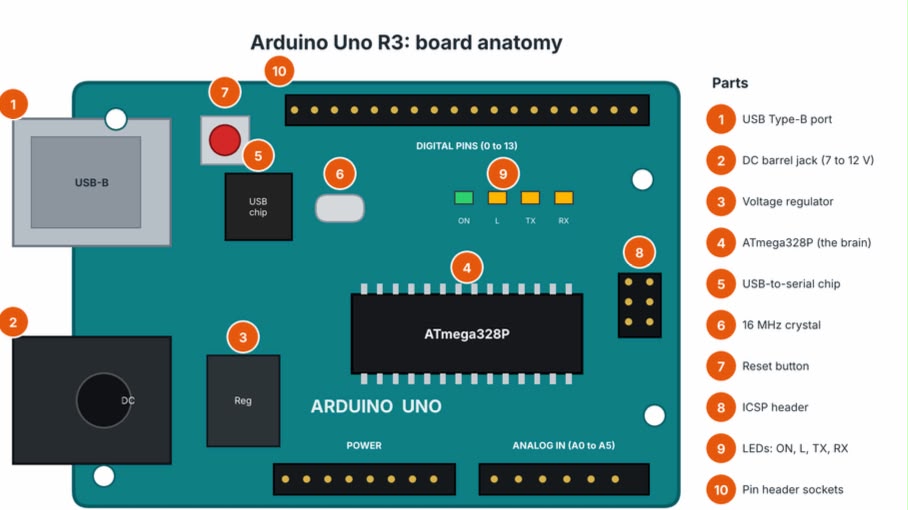
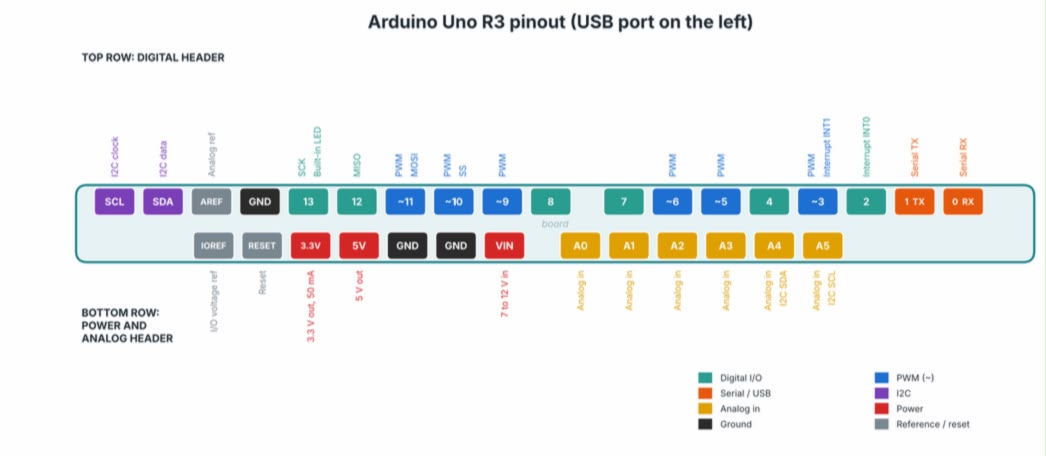
Reading the pinout
- Digital pins 0 to 13: input or output (HIGH is 5 V, LOW is 0 V). Keep pins 0 and 1 free; they share the USB serial link.
- PWM pins (~): 3, 5, 6, 9, 10 and 11. analogWrite(pin, 0 to 255) dims an LED or sets motor speed.
- Analog pins A0 to A5: analogRead() turns 0 to 5 V into 0 to 1023.
- Buses and power: I2C on A4 (SDA) and A5 (SCL); SPI on 10 to 13; interrupts on 2 and 3; power pins 5V, 3.3V, VIN and GND.
Safety rules
- Use a resistor with every LED (220 ohm is typical) and a driver module for motors or relays.
- Never feed more than 5 V into a pin. Join all grounds, and rewire only with the board unplugged.
ESP32 basics and pinout
The ESP32, made by Espressif, is a low-cost microcontroller with Wi-Fi and Bluetooth built in, which makes it the usual choice for IoT (internet-connected) projects. It is much faster than an Uno but works at 3.3 V. You meet it on development boards such as the ESP32 DevKit. Related chips include the ESP8266 (older, Wi-Fi only) and the newer ESP32-S3 and ESP32-C3.
| Feature | ESP32 DevKit (30-pin) |
|---|---|
| Chip | ESP32, dual-core Xtensa LX6, up to 240 MHz |
| Logic voltage | 3.3 V (pins are not 5 V tolerant) |
| Memory | 520 KB SRAM, about 4 MB flash (varies by board) |
| Wireless | Wi-Fi 802.11 b/g/n (2.4 GHz) and Bluetooth (Classic and BLE) |
| Pins | 25 usable GPIO; PWM on almost any output pin |
| Analog | 12-bit ADC inputs (0 to 4095); 2 DAC outputs (GPIO25, GPIO26) |
| Power input | 5 V via USB or VIN; an onboard regulator makes 3.3 V |
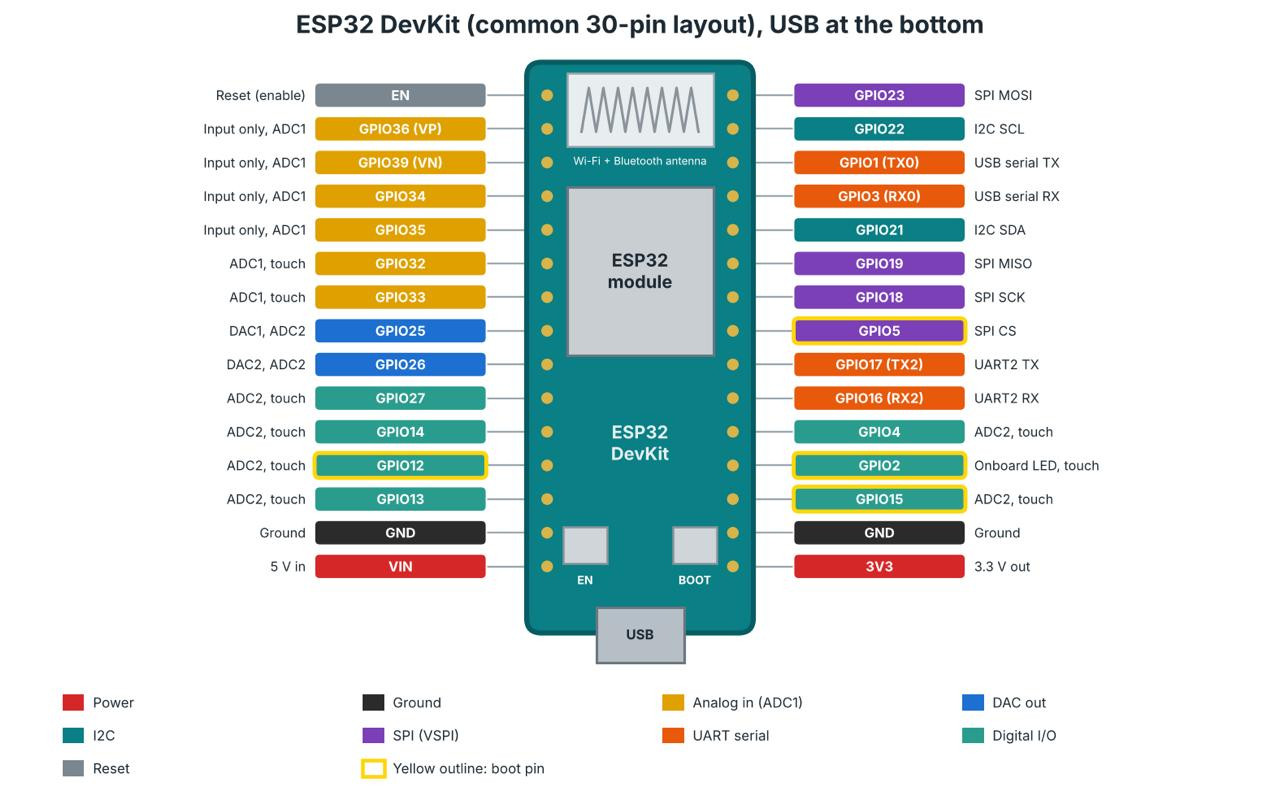
Know before you wire
- 3.3 V logic: a 5 V signal can damage a pin; use a level shifter or voltage divider.
- Input-only pins: GPIO34, 35, 36 and 39 (no output, no internal pull-ups).
- ADC2 and Wi-Fi: ADC2 pins (GPIO0, 2, 4, 12 to 15, 25 to 27) cannot be read while Wi-Fi is on; use ADC1 (GPIO32 to 39).
- Boot (strapping) pins: GPIO0, 2, 5, 12 and 15 are read at reset; parts wired to them can block booting or uploading.
- Defaults: I2C on GPIO21 (SDA) and 22 (SCL); SPI on GPIO23, 19, 18 and 5; UART2 on GPIO17 and 16; GPIO1 and 3 carry the USB serial link. Most can be remapped. Labels vary by maker, so check your board.
Arduino IDE basics (and a note on ESP-IDF)
The Arduino IDE is a free program that puts a code editor, a compiler and an uploader in one window. A program written in it is called a sketch and is saved as a .ino file. The same IDE programs the Uno and the ESP32. To install it, download Arduino IDE 2.x from arduino.cc/software, run the installer and plug your board in with a USB data cable. Every sketch has two parts: setup() runs once at power-up and loop() repeats forever.
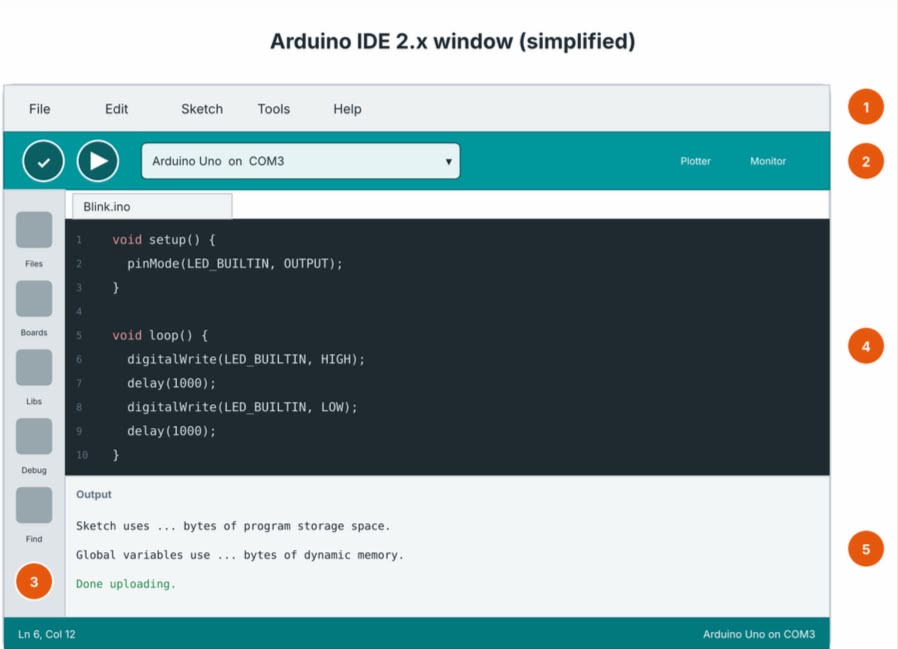 Simplified illustration of the IDE 2 window, not a screenshot. Your version may look slightly different.
1 Menu bar: File > Examples holds ready-made programs and Tools sets the Board and Port.
2 Toolbar: Verify (check mark) finds errors, Upload (arrow) sends the program to the board, the drop-down picks board and port, Serial Monitor shows what the board prints and Serial Plotter graphs numbers.
3 Sidebar: Boards Manager (adds ESP32) and Library Manager.
4 Code editor.
5 Output panel and status bar, showing errors and the selected board and port.
Uploading your first sketch
- Choose Tools > Board (Arduino Uno, or ESP32 Dev Module) and Tools > Port.
- Open File > Examples > 01.Basics > Blink, then click Verify and Upload.
- Open the Serial Monitor and match its baud rate (communication speed) to the number in Serial.begin(): 9600 on the Uno, often 115200 on ESP32.
Adding ESP32 support
- File > Preferences: paste https://espressif.github.io/arduino-esp32/package\_esp32\_index.json into Additional boards manager URLs.
- Boards Manager (sidebar): search "esp32" and install esp32 by Espressif Systems.
- Select ESP32 Dev Module. If the upload hangs on "Connecting...", hold the BOOT button.
Quick check that your board works
- Power and port: the ON LED lights and a new port appears under Tools > Port.
- Blink and Serial: Blink makes the built-in LED blink once a second, and a Serial.println() line shows in the Serial Monitor.
If all four pass, the board is healthy and any later problem is in your wiring or code.
Note: ESP-IDF. ESP-IDF (Espressif IoT Development Framework) is Espressif's official C/C++ toolchain for ESP32, built on FreeRTOS. It gives fine control over Wi-Fi, Bluetooth, power modes and over-the-air updates, so it is used for advanced and production work. It has a steeper learning curve and runs from the command line or VS Code. The Arduino core for ESP32 is itself built on ESP-IDF, so start in the Arduino IDE and move to ESP-IDF when you need that control. See the ESP-IDF documentation.
Arduino vs ESP32: where to use what
Pick the Uno for learning and simple 5 V projects. Pick the ESP32 when you need wireless, more speed or more memory.
| Feature | Arduino Uno R3 | ESP32 DevKit |
|---|---|---|
| Chip and speed | ATmega328P, 8-bit, 16 MHz | ESP32, 32-bit, dual-core, up to 240 MHz |
| Memory | 2 KB SRAM, 32 KB flash | 520 KB SRAM, about 4 MB flash |
| Wireless | None | Wi-Fi and Bluetooth |
| Logic voltage | 5 V | 3.3 V (not 5 V tolerant) |
| Analog | 6 inputs, 10-bit; PWM output only | Many 12-bit inputs (ADC2 limited with Wi-Fi); 2 DAC outputs |
| Beginner friendliness | Very forgiving: 5 V, simple, huge shield ecosystem | More to watch: 3.3 V, boot pins, Wi-Fi limits |
| Battery life | Not designed for it | Deep-sleep modes suit battery projects |
Which one for which job?
| Project idea | Better choice | Why |
|---|---|---|
| First LED, button and sensor experiments | Uno | Simple, forgiving, and every tutorial uses it |
| 5 V sensors, relay boards, LCD and motor shields | Uno | Native 5 V logic and a huge shield ecosystem |
| Home automation, cloud data logging, dashboards | ESP32 | Wi-Fi is built in |
| Phone control (Bluetooth), web server, MQTT | ESP32 | Bluetooth and networking are built in |
| Battery-powered wireless sensor node | ESP32 | Deep sleep plus wireless |
| Fast sampling, audio, complex code | ESP32 | Dual core at 240 MHz and far more RAM |
Either board handles LEDs, buttons and basic sensors. Many students start on the Uno and add an ESP32 for IoT; the code is Arduino C/C++ on both, so what you learn carries over.
Troubleshooting: where to look
Each row gives the problem and where to look, not the answer. Change one thing at a time and test after each change.
| Problem | Where to check |
|---|---|
| No port under Tools > Port | Data or charge-only cable? ON LED lit? Does your computer know the board's USB chip? |
| Upload fails ("not in sync", timeout) | Do the selected board and port match what is plugged in? Anything on the serial pins during upload? |
| ESP32: upload stops at "Connecting..." | What does the board expect from you as the upload starts? Check its buttons and the ESP32 steps above. |
| Upload works but nothing happens | Does the pin in the code match the wiring? Set as input or output? Does the built-in LED respond? |
| LED stays off | Which leg faces the pin? What is between the pin and ground? Is the resistor value sensible? |
| Serial Monitor shows garbage or nothing | Compare the monitor's speed with Serial.begin(). Right port? Is anything printed at all? |
| Sensor or button readings jump around | What does the pin read with nothing attached? Common ground? How firm are the connections? |
| Board resets randomly or gets hot | What else draws current from the supply? Does it happen when a motor switches on? Any parts touching? |
| Compile error ("not declared", "No such file") | What does the first red line say? Spelling and capitals? Library installed and included? Right board selected? |
| ESP32: analog readings wrong once Wi-Fi starts | Which ADC group is that GPIO in? See the ADC notes on the ESP32 page. |
| ESP32: will not boot or upload after adding a module | Which pins are read at reset? Is your module on one of them? |
| ESP32: module acts oddly or a pin stopped working | What voltage does the module's signal pin output, and what is the ESP32 pin rated for? |
| ESP32: Wi-Fi will not connect | Which band does your network use? Are name and password exact? What does the Serial Monitor print? |
Further reading
- Arduino language reference: every function explained with examples
- Wokwi: free online simulator for Arduino and ESP32, handy when you have no hardware
Specs follow the manufacturers' published figures; check the datasheet before designing a real product.
Official Arduino Uno Rev3 page with datasheet, pinout and tutorials: Arduino Uno Rev3 documentation