
LEVEL 1 REPORT
3 / 3 / 2026
LEVEL 1 REPORT
Electronic Design
TASK 1: Engineer’s Swiss Army Knife
Objective:
To get familiar with the basics of MATLAB through the Onramp course available on its official website.
Methodology:
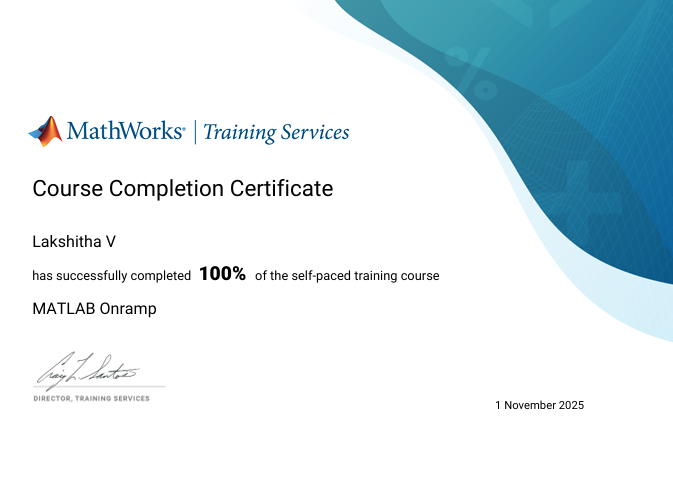
I created a MATLAB account and then completed the Onramp course. Through this task, I learned the basics of MATLAB. I first familiarized myself with the MATLAB interface — the Command Window, Workspace, and Editor (Script) — along with their functions. Then I learned the basic MATLAB syntax, for example, the usage of semicolons, naming variables, saving variables into a MAT file, loading variables from a MAT file, and using the clear and clc commands. I also learned about built-in constants and functions in MATLAB. Further, I learned how to create row vectors, column vectors, and matrices, as well as shorthand methods for evenly spaced vectors (using colon and linspace). I explored a few MATLAB functions used to create commonly used matrices. I also used the size function. Then, I learned about array indexing and the use of the colon operator in array indexing. I learned how to access and manipulate array elements using indexing and the assignment operator. I learned about basic operations on arrays and a few statistical functions that can be applied to a vector. I discovered that we can use square brackets with certain functions to request more than one output. I also learned how to access and use the MATLAB documentation to learn about functions whenever necessary. I learned about the plot function, which is used to plot two vectors of the same length against each other (if we use a single vector, its values are used as the y-axis data, and the x-axis is taken as the range from 1 to n, where n is the number of elements in the vector). I also learned how to specify the color, line style, and marker of a plot. I learned that we can plot one line on top of another (i.e., in the same axes, without creating a new plot) by using the hold on command, and that we can use the hold off command to return to the default plot behavior. I also learned how to set properties using name-value arguments. Apart from the plot function that creates lines, there are many other plotting functions in MATLAB. We can add labels to plots by using annotation functions such as title, xlabel, and ylabel. We can also add a legend by using the legend function. I worked with tables and learned how to extract variables from them and interact with them. I learned to use relational and logical operators individually as well as in combination. I understood and implemented the concept of logical indexing. I then used if-else statements and for loops, first in simple applications and later in creating plots as well. With all this, I became familiar with the basics of MATLAB and then moved on to the project included in the course to test my skills.
Project Description:
Project – STELLAR MOTION: To calculate the speed of stars relative to the Earth by using their spectrum.
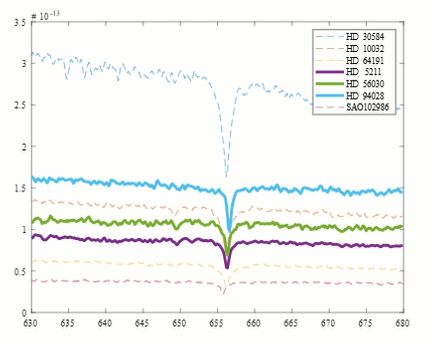
The data regarding star spectra was provided in the spectra matrix, which was collected at evenly spaced wavelengths. We were given the starting wavelength, the spacing, and the number of observations. I started by calculating lambda_end, using which I created a vector named lambda that contained all the wavelengths in the spectrum. Each column of the spectra matrix corresponded to a specific star. The star of interest, HD 94028, had its data in column 6. I extracted the 6th column into another vector s. I then plotted the spectra as a function of wavelength and found the wavelength of the hydrogen alpha line — the wavelength at which intensity is minimum — using the min function. I marked the location of the hydrogen alpha line. The wavelength of the hydrogen alpha line found above was slightly longer than the laboratory value, which indicated a redshift (the speed value turned out to be positive), meaning the star is moving away from the Earth. To calculate the speed, I first calculated the redshift factor and then multiplied it by the speed of light. Using the same script, I performed the task on different stars. I then carried out the calculation as well as plotting for all the stars at once, indicating redshifted and blueshifted stars with different line styles. Through this project, I gained hands-on experience using MATLAB for a realistic and interesting analysis.
Outcome:
Familiarized myself with the basics of MATLAB and gained hands-on experience using MATLAB for a realistic and interesting analysis.
TASK 2: Cut, Pass, Repeat
Objective:
To learn about Band Pass Filters and design a second order active band pass filter(using OpAmps) that amplifies the signal to roughly 1.5 times the original signal with cutoff range between 4kHz and 10kHz
Methodology:
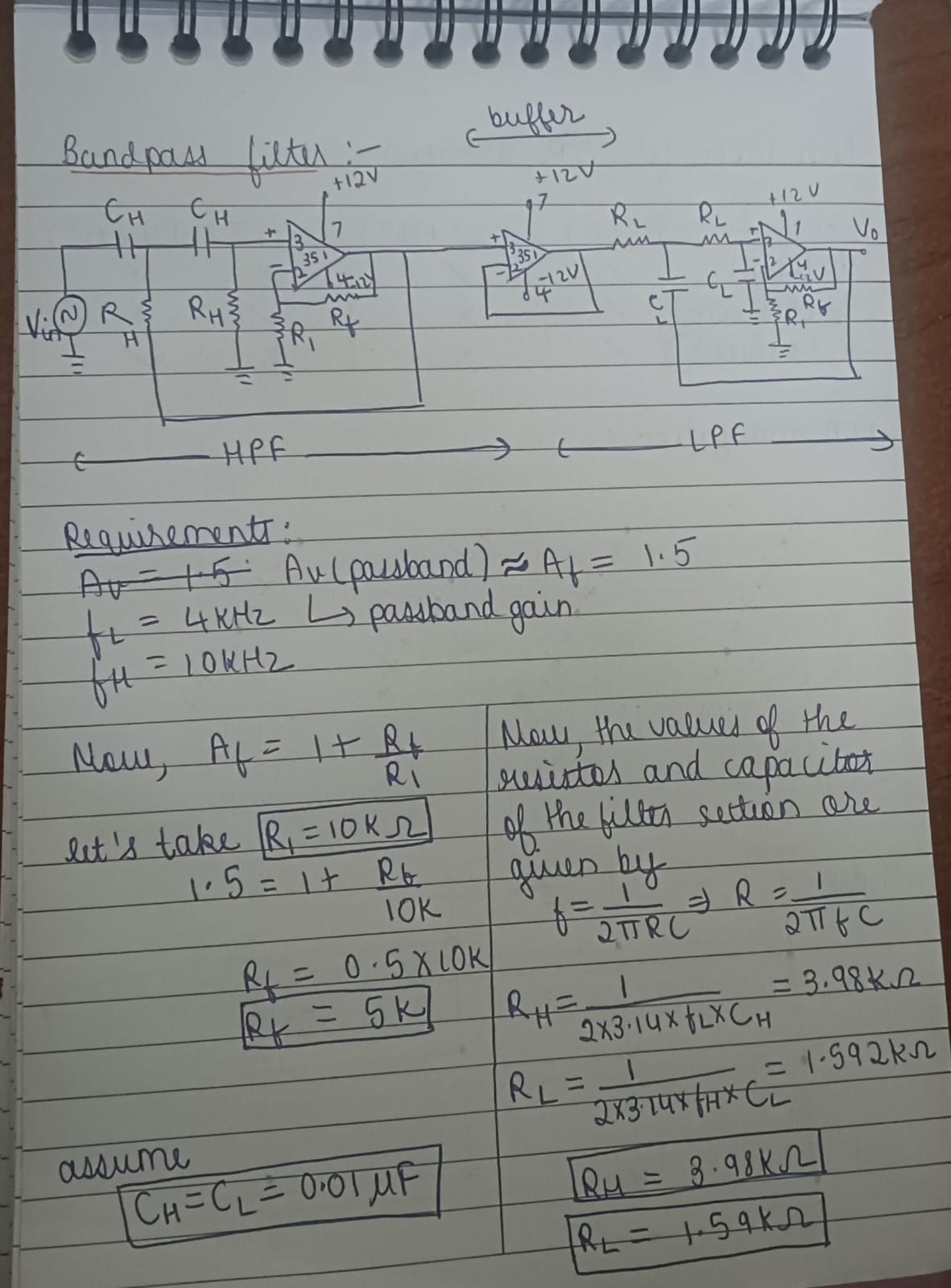
I first designed the bandpass filter according to the given specifications. The design is shown in the below image:
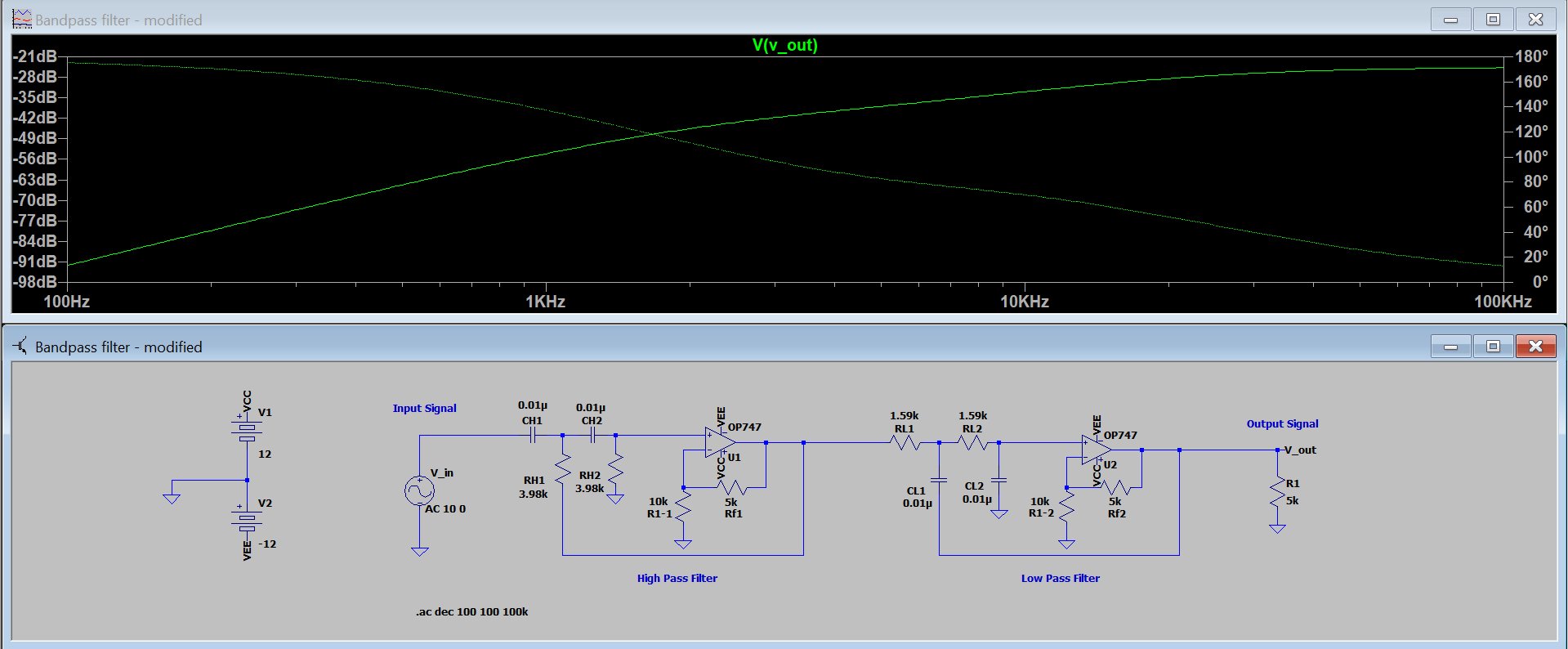
I then created a schematic of the designed circuit in LTspice and simulated it to observe the frequency response of the filter, as shown below:
Theory:
A bandpass filter is obtained by cascading a high-pass filter and a low-pass filter. Both filters operate based on the frequency-dependent behavior of a capacitor, whose reactance is given by x = 1/2pifC. At low frequencies, the capacitor behaves like an open circuit, and at high frequencies, it behaves like a short circuit. In a high-pass filter, the capacitor blocks low-frequency signals (since it acts as an open circuit) and allows high-frequency signals to pass (since it acts as a short circuit). In a low-pass filter, the capacitor shorts high-frequency signals to ground and allows low-frequency signals to appear at the output. When these two filters are cascaded, frequencies below the lower cutoff are blocked by the high-pass filter, frequencies above the upper cutoff are blocked by the low-pass filter, and only the overlapping range between the two cutoff frequencies is allowed to pass, forming the bandpass response.
Outcome:
Learnt about band pass filters and designed one according to the given specifications.
TASK 3: SPICEy Code
Objective:
To learn SPICE code and write basic SPICE code for a MOS inverter, AND, and OR gates.
Methodology:
I installed LTspice. I wrote the SPICE code for a MOS inverter in Notepad and saved it as a CIR file. I opened the file in LTspice and then ran it. I obtained the required plot of a MOS inverter, where the output signal is the inverted form of the input signal. I repeated the same process for the AND and OR gates and obtained their respective plots.
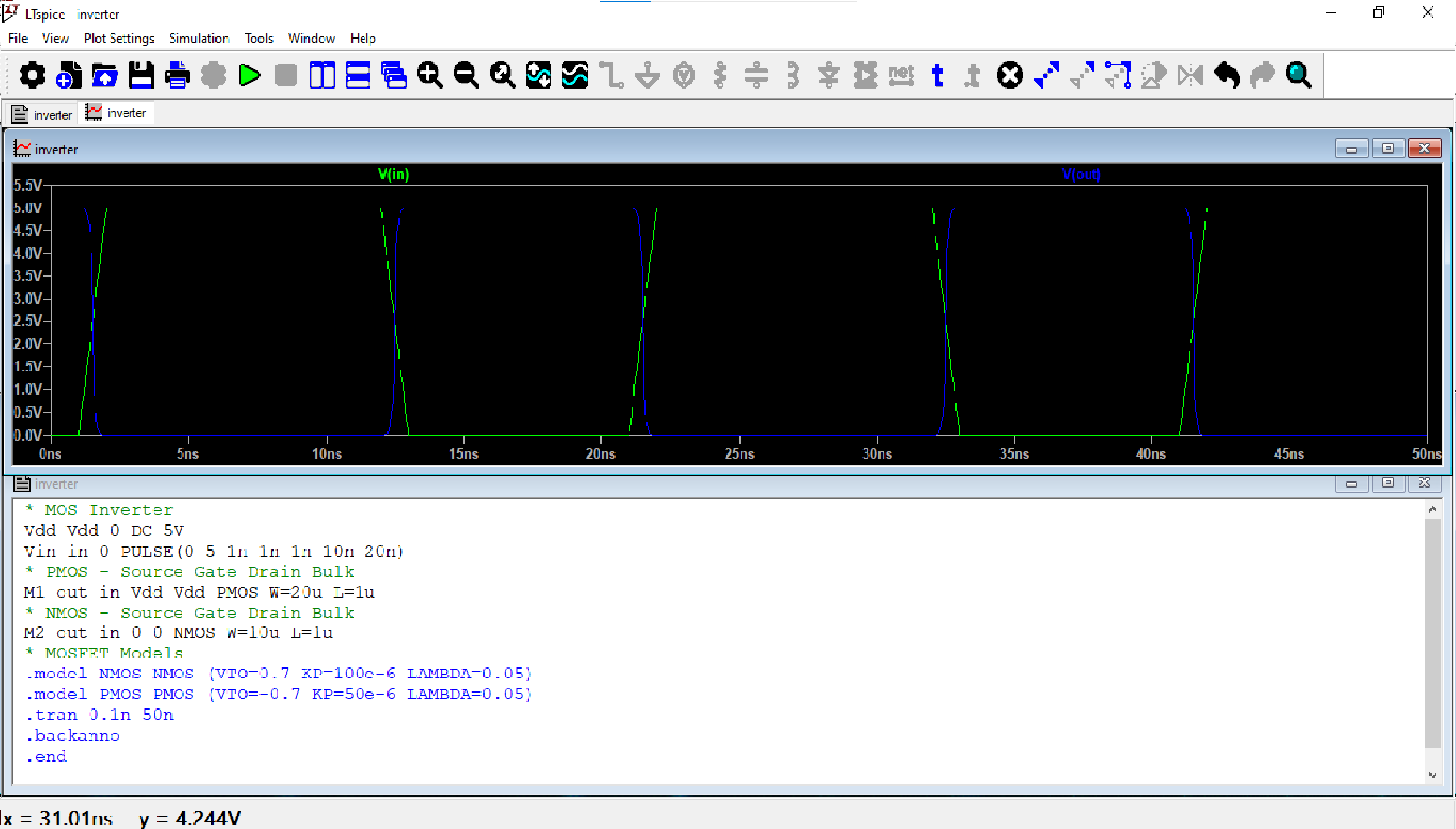
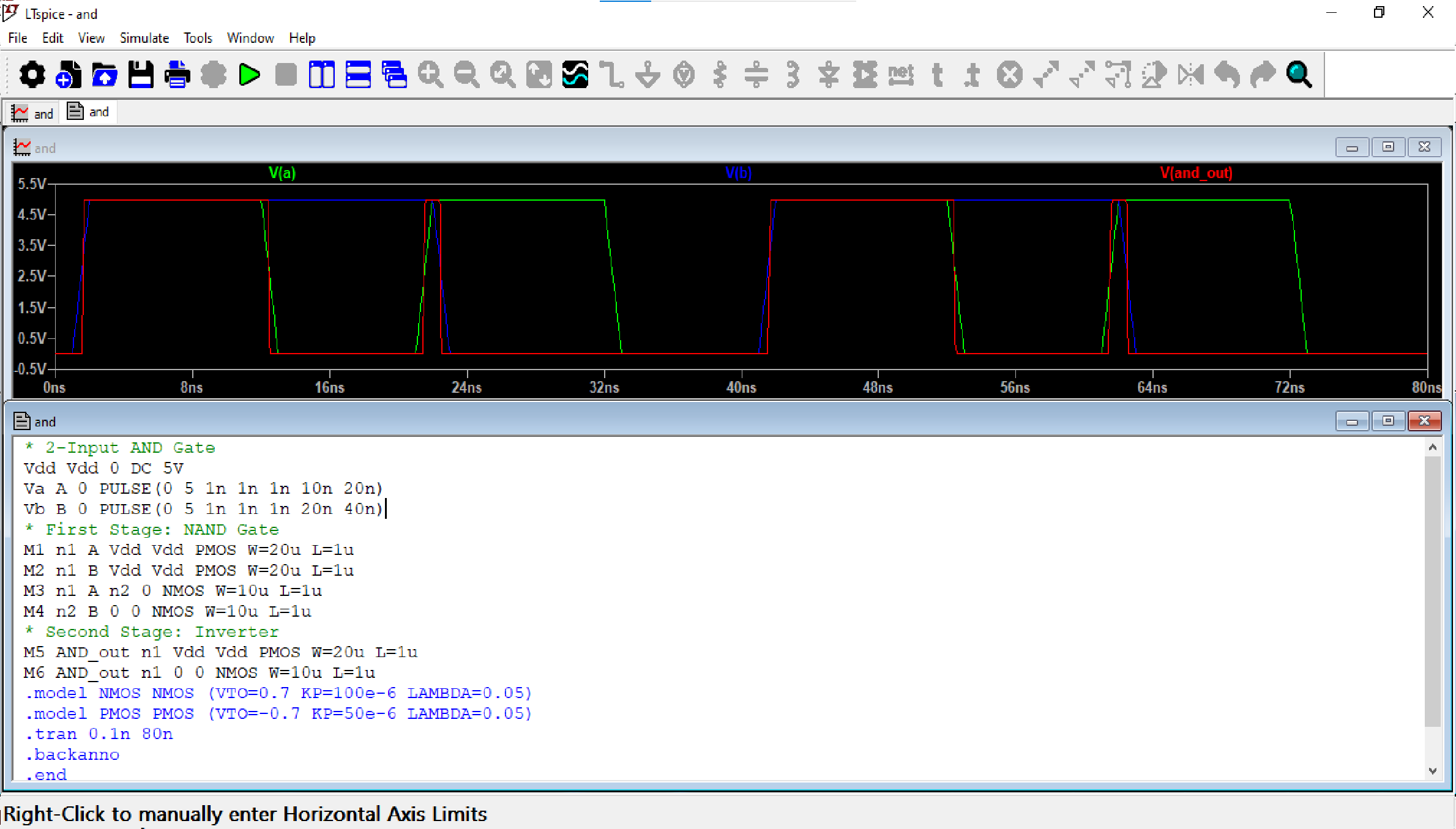
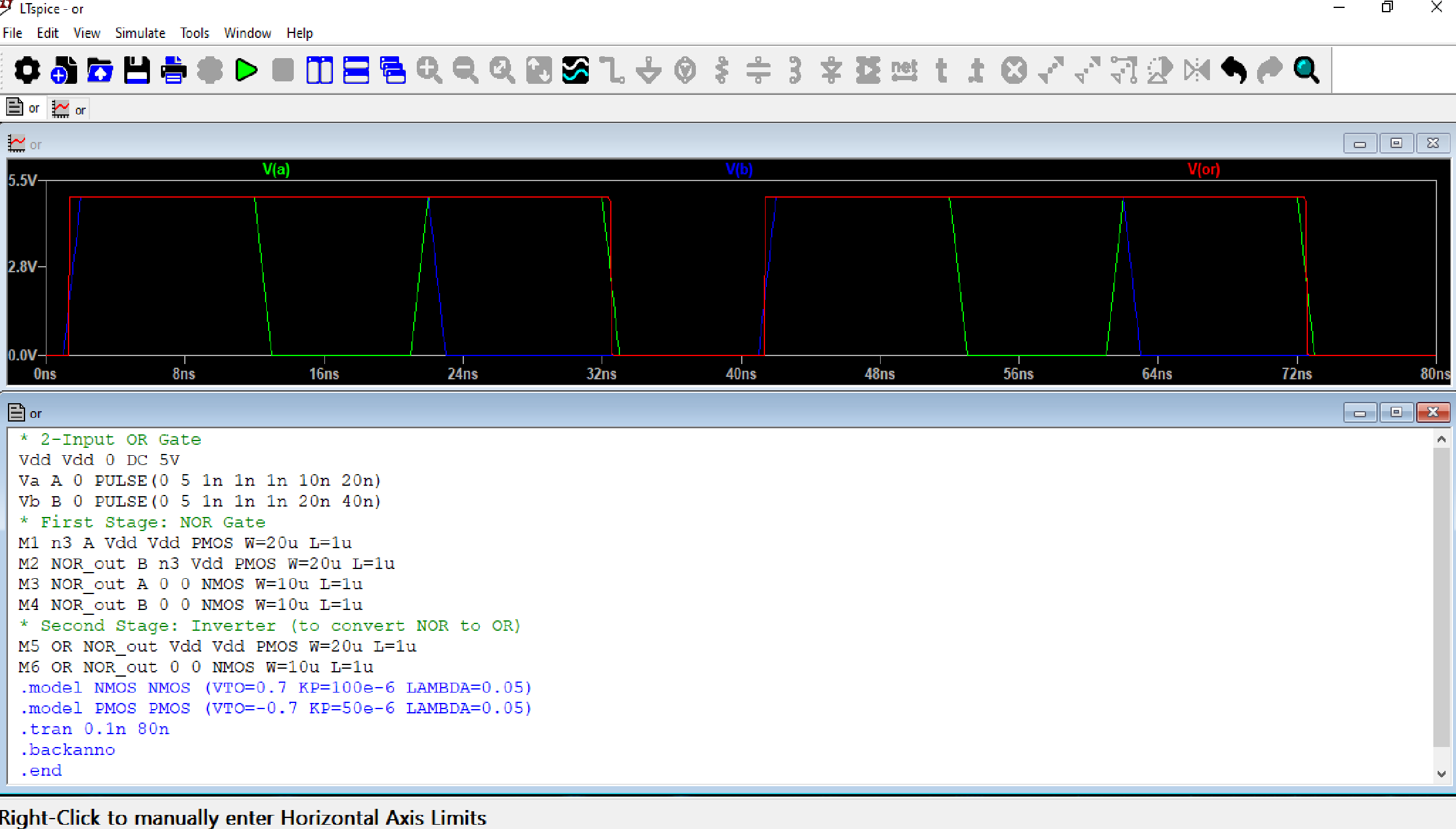
Theory:
SPICE code is a set of written instructions that tell the simulator what components are in the circuit, how they are connected, and what type of analysis to perform. The circuits corresponding to the above codes are as follows:
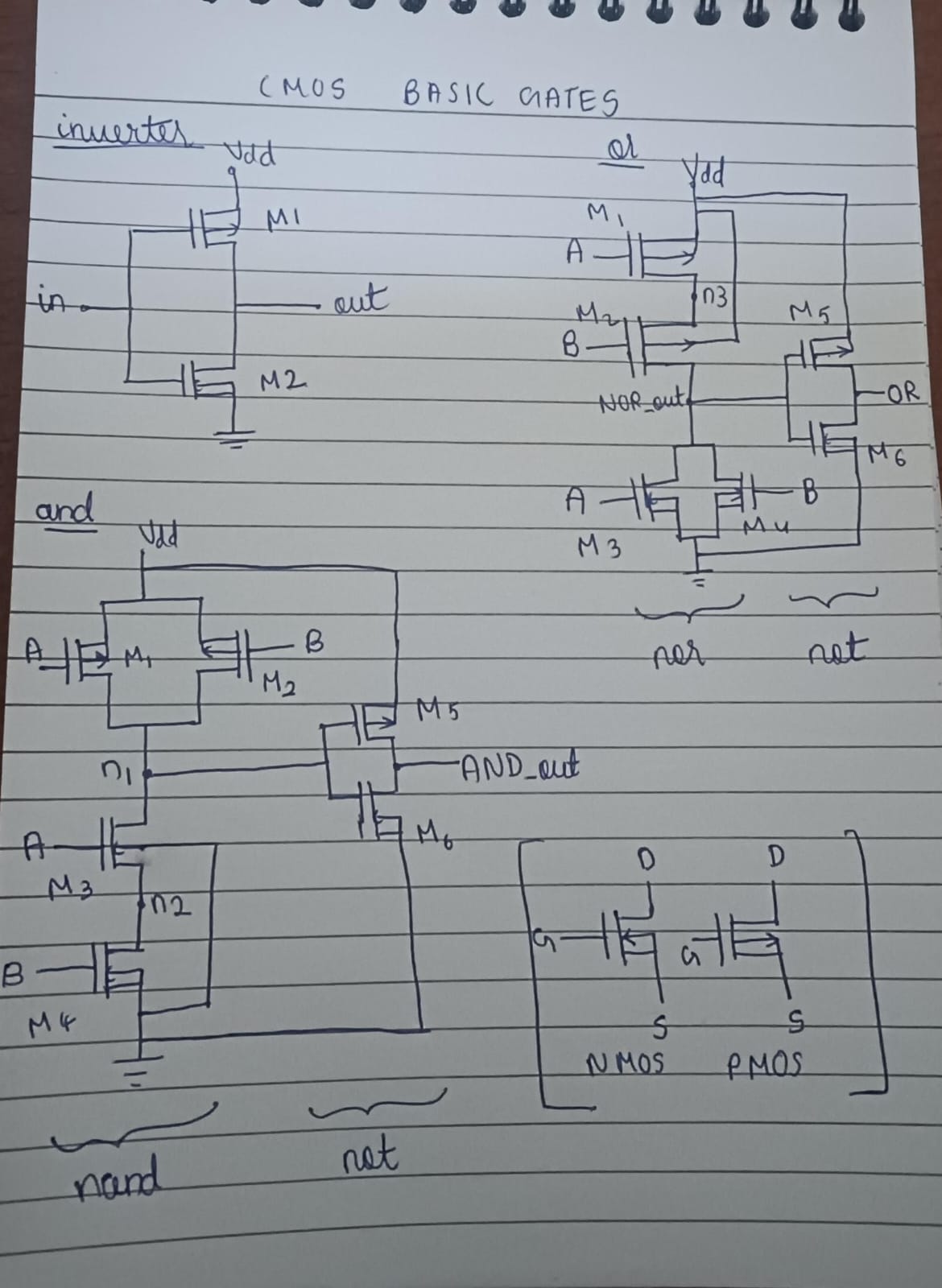
The diagram shows basic CMOS logic gates built using complementary PMOS (pull-up) and NMOS (pull-down) networks. In a CMOS inverter, one PMOS connected to Vdd and one NMOS connected to ground share the same input; when the input is 0 the PMOS turns ON and pulls the output high, and when the input is 1 the NMOS turns ON and pulls the output low, producing the complement. In a NAND gate, PMOS transistors are connected in parallel and NMOS transistors in series so the output goes low only when both inputs are high, while in a NOR gate the PMOS are in series and NMOS in parallel so the output goes high only when both inputs are low. AND and OR gates are obtained by adding an inverter to NAND and NOR respectively. The key CMOS design rule is that the pull-up (PMOS) network is the dual of the pull-down (NMOS) network, and NMOS conducts for logic 1 while PMOS conducts for logic 0.
Outcome:
Learned how to write SPICE code and implemented basic gates using SPICE code.
TASK 4: From Low to Woah!
Objective:
To design a voltage multiplier using capacitor pumps and a 555 Timer IC. Pump up 9V to 18V at first, then cascade the pump to get 27V.
Methodology:
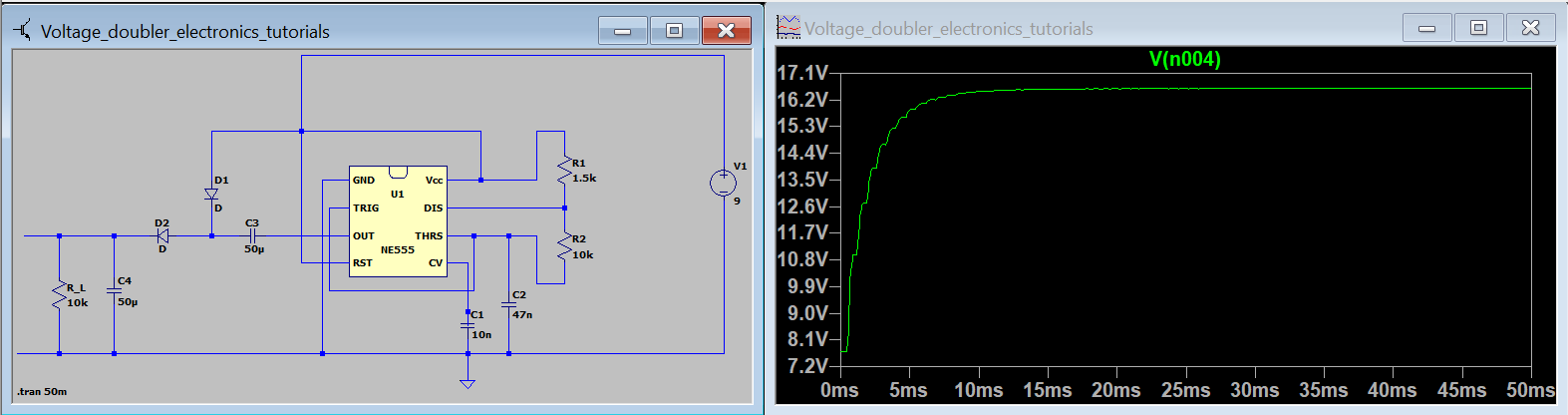
I created the circuit schematic for voltage doubler and simulated it to look at the output waveform which was almost double the input as shown below:
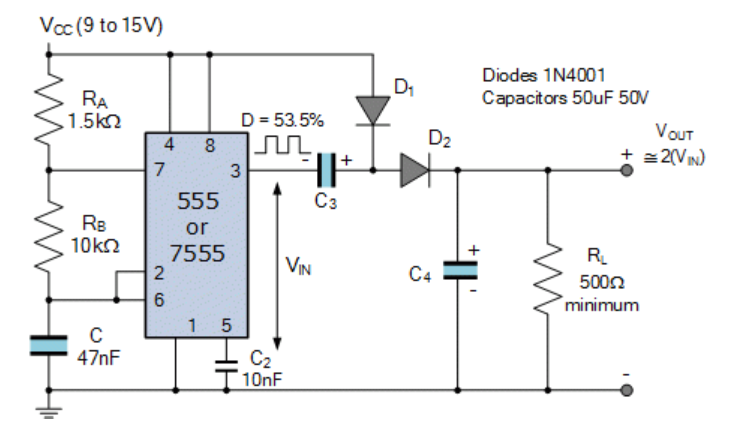
The circuit I used as reference:
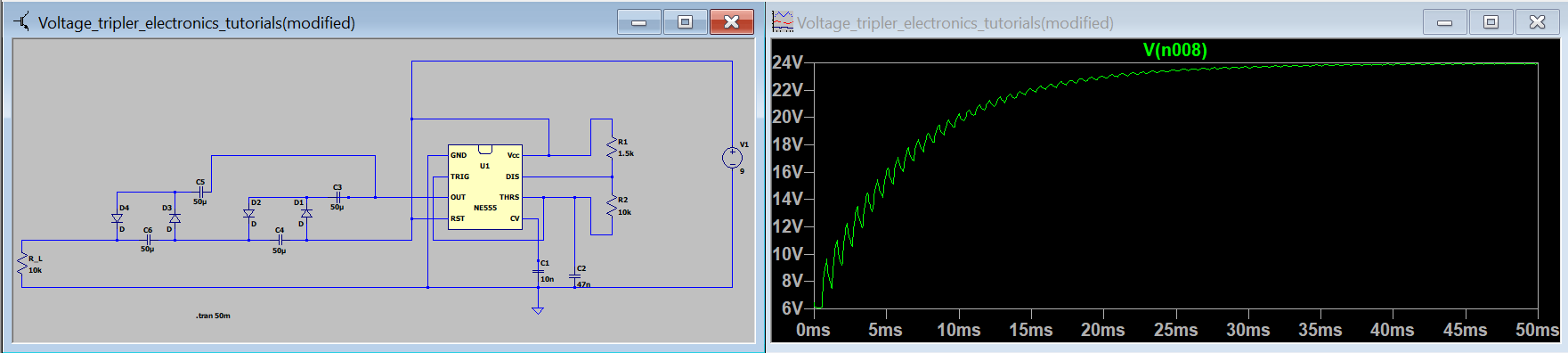
I then created the circuit schematic for a voltage tripler by cascading stages and simulated it to observe the output waveform, which was approximately three times the input voltage, as shown below:
Theory:
These circuits are used to produce multiples of input voltage at the output using diode capacitor sections.
Outcome:
Learnt about voltage multipliers and simulated them.
TASK 5: The Power Shuffle: Buck-Boost Edition
Objective:
To learn about the DC-DC Converters (Boost and Buck converters) and perform the following: Build a 1.5V to 5V DC-DC Boost converter Build a 12V to 5V DC-DC Buck converter
Methodology:
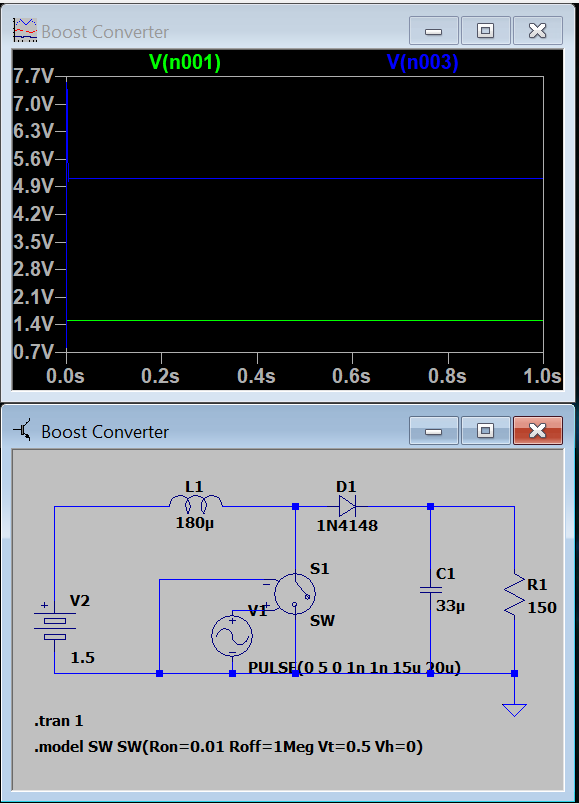
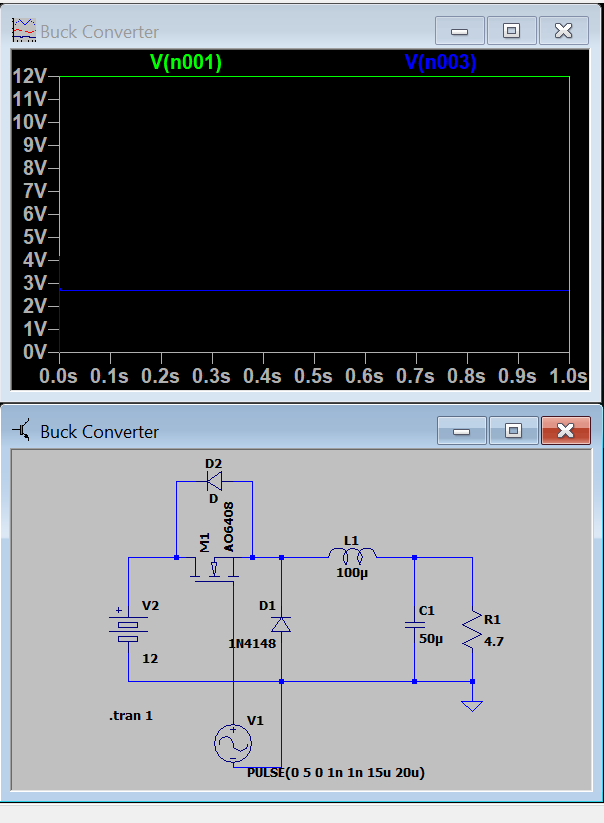
I first read upon the basics of the DC-DC Converters (Boost and Buck converters). I then created the circuit schematic of a 1.5V to 5V DC-DC Boost converter using LTspice and then simulated it to perform a transient analysis and observe the waveforms of the input and output voltages (vs time). I repeated the same for a 12V to 5V DC-DC Buck converter.
Boost Converter
Buck Converter
Theory:
A buck converter and a boost converter are DC–DC converters used to change one DC voltage level to another using high-speed switching along with an inductor, diode (or switch), and capacitor. A buck converter reduces (steps down) the input voltage to a lower output voltage by rapidly turning the supply on and off and smoothing it to a steady lower value. A boost converter increases (steps up) the input voltage to a higher output voltage by storing energy in an inductor when the switch is on and releasing that energy to the load when the switch is off.
Outcome:
Learned what the DC-DC Converters (Boost and Buck converters) are, and also how to design and simulate them according to the given specifications using LTspice.
TASK 6: 4 Bits to Rule Them All
Objective:
To design and implement a 4-bit Arithmetic Logic Unit (ALU) that performs the following operations: addition, subtraction (using 2’s complement), and logical operations (AND, OR, XOR) in CircuitVerse. And also to design a control unit to select the desired operation based on input signals and display the result along with any carry/overflow flags when applicable.The ALU must be efficient in terms of gate usage and scalable for future expansion.
Methodology:
After going through several resources, I understood what an ALU is and got an idea regarding the process of designing and simulating one. I first created a full adder circuit in circuitverse using basic logic gates.
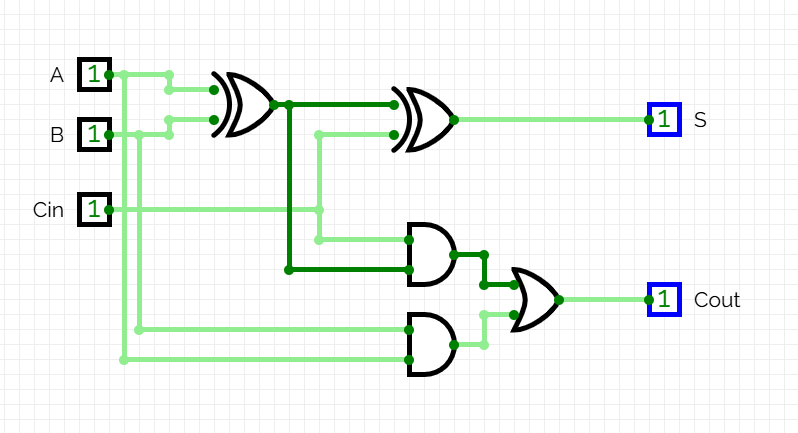
Using that as a subcircuit, I created a 4-bit adder, ensuring correct handling of carry bits. I then extended this design to support subtraction by using 2’s complement. These perform the arithmetic operations of the ALU ie. addition and subtraction. I then implemented the logical functions AND, OR, XOR and also negation/inversion with the same 4-bit inputs. These perform the logical operations of the ALU. I used a multiplexer to select the desired operation based on input signals, which serves as the control unit. The required result is displayed appropriately.
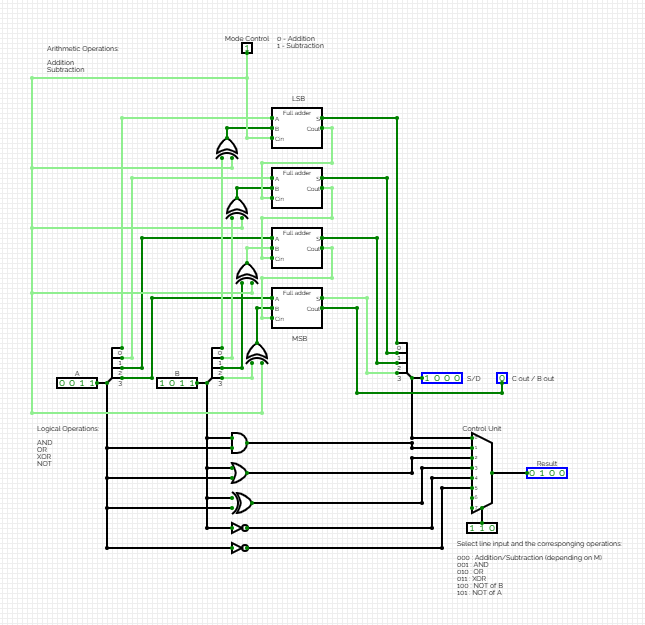
Link to the simulation video
Outcome:
I learnt the basic working of an ALU and also learnt how to design and simulate one. I also familiarised myself with circuitverse.
TASK 7: The PCB Revolution
Objective:
To Learn basics of PCB Designing by applying for the Altium student license and completing the Altium Student Lab PCB coursework.
Methodology:
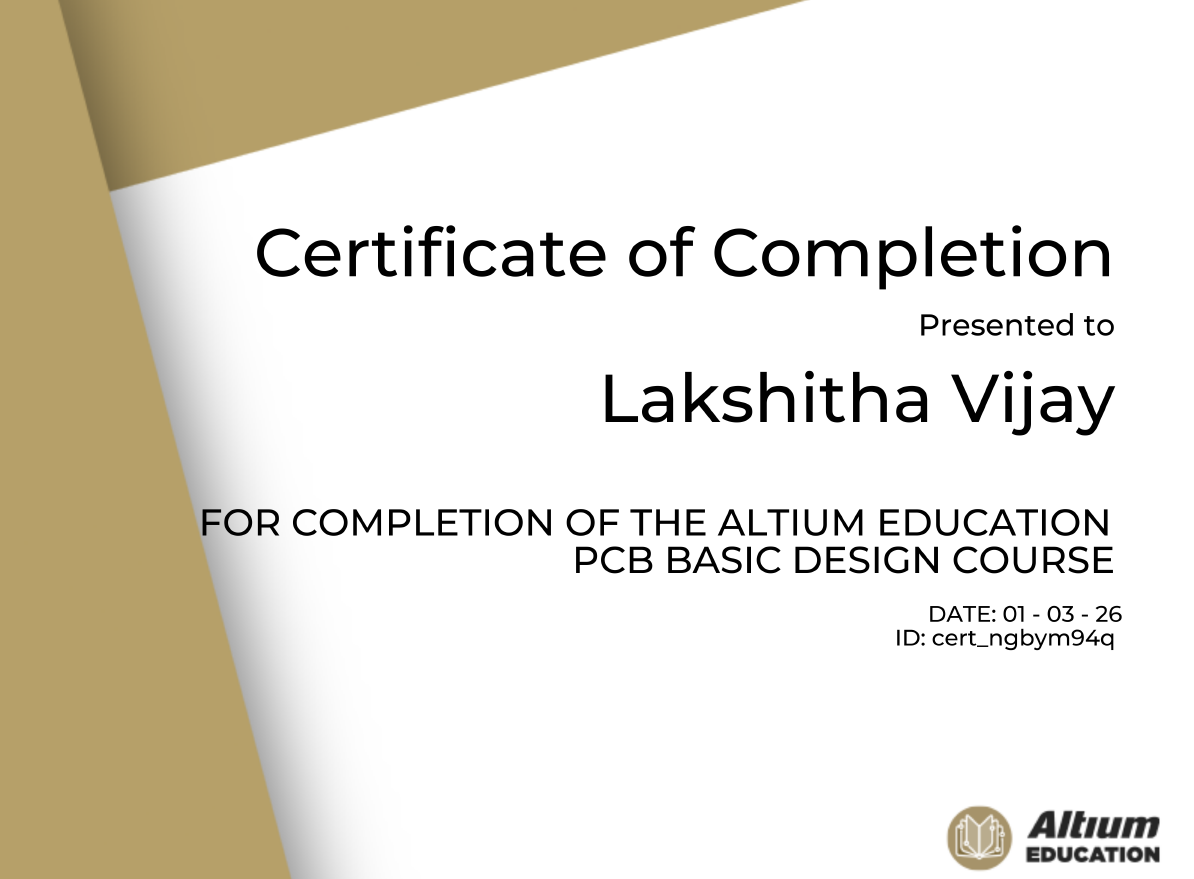
I applied for and recieved the Altium student license and completed the Altium Student Lab PCB coursework. In this process I learnt the basics of PCB designing, including Schematics and Libraries, PCB Layout, Routing and Basic Signal Integrity, PCB Manufacturing and Fundamentals of Purchasing and Supply Chain. After clearing the final quiz, I recieved my certificate.
Outcome:
Learnt the basics of PCB Designing.
TASK 8: Convolution Countdown
Objective:
To theoretically learn basics of Digital Signal Processing and perform convolution using MATLAB.
Methodology:
I learnt the basics of DSP including an introduction to signals, systems and mathematical transforms such as Z-Transform and Fourier Transform.
Signals & Systems
Click here for PART - 2 of my report