
COURSEWORK
Krupa's EV-RE-001 course work. Lv 2
| Krupa R | AUTHOR | ACTIVE |
28 / 3 / 2026
TASK 1 : 3D-Printing
Objective - Understand the working of a 3D printer, check out the online resources. Understand what's an STL file, and then learn to slice it(using ultimaker or creality slicer).Go through the SOP's regarding the 3D printer. Learn about bed temperature, infill density and other printer settings. Finally get andSTL file from the internet, and slice it and put it for print.
Learning and Outcomes -
Fusion deposition melting - It is a concept of melting a spool of filament layer by layer to build the required model on the printer.This method of printing the object is easy compared to resign printing.
Functions of few parts in FDM 3D-Printers:
- Bed - a plate on which all the objects get printed onto.
- Hot end - combination of parts that heat up the filament and extrude it through the nozzel.
- Stepper Motors - used to move the belts for x,y and z axes.
3D-models and slicing - A 3D model can be created using software platforms like fusion360,thinkercad etc,. And the output from that model is called Stereol lithiography file(STL).
Slicing software - It is a program that takes STL files and with some instructions like how to print the object, it convert those instructions in a way that a printer can understand. The output file that the slicer saved is called G-code file.
Filaments that are normally used to do 3D-printing:- PLA, PETG, nylon, carbonfiber, conductive filament, wood fiber, water soluble etc,.
To print this cat model, Poly acetic acid(PLA) was used.

TASK 2 : API
Objective - What is an API? Learn the working of an API and it's application. Using any API of your choice, build an user interface(web app, mobile app, etc), where you can make call and then display the necessary information.
Learnings and Outcomes - I learned that an API(Application program interface) is a messanger that takes request and tells a system what we want to do and then returns the response back to us, usually in JSON format.
In my project, I built a stock web app using Node.js as backend and HTML, CSS and javascript as frontend. I connected to free yahoo finance API to fetch live stock data such as price, open, High/Low, Market Cap. I successfully displayed this data on a simple web page where user can enter company ticker. Through this, I understood how endpoints, requests, and responses work, and gained hand-on experience in building a small project that integrates an API with a user interface.


TASK 3 : Working with Github
Objective - Familiarize yourself with Github integrated workflows (Github action), issues and pull requests with this task.
Learnings and Outcomes -
- By doing this task I made myself familiar with Github.
- I learned how to create my repositories and delete them.
- I learned how to make public/private repositories.
- First I forked the marvel repository to my repository and then I cloned it and performed the marvel task as instructed.

TASK 4 : Get familiar with the command line on ubantu and do the following subtasks:
Objective -
- Create a folder named test.
- cd into that folder.
- Create a blank file without using any text editors.
- List the files in that folder.
- Create 2600 folders in this folder where each folder is named like . For example, M90 0r B56.
- Concatenate two files co=natining any random text and display them on the terminal.
Learning and Outcomes - I learnt about basic command lines in Ubantu and I made myself familiar with them.
Functions of command lines used -
- mkdir - it creates a directory.(In this I have created a directory named as "marvelTask1")
- cd - used to navigate between different directories in the file system.
- ls - Used to list all the files in the opened directory.
- cat - This is used to view the contents of a text file, concatenating the files, and also to create new files.


TASK-6 : The Matrix Puzzel - Decoded with NumPy & Reveal the Image
Objective - Get hands-on with NumPy and Matplotlib by solving a visual puzzle. You'll be given a scrambled matrix, and your mission is to decode it into a hidden image using NumPy operations and visualization techniques.
Learnings and Outcomes -
- By doing this task, I got know about NumPy and Matplotlib.
- First, I opened the given, matrix in python and realised that the given shape was (200,50) so the size was 10000.
- Then I reshaped it to (100,100) and changed the colour from grey to winter in the Jupyter Notebook.

TASK 7 : Create a Portfolio Webpage
Objective - Create a website to showcase your portfolio-about yourself, interests, projects, social media profiles and more. It has to be responsive and also pushed to got repository. CSS can be of you choice and any framework can be used.
Learning and Outcomes -
Created a successful responsive portfolio using HTML and CSS. By doing this task, I had more deeper understanding of HTML and CSS.
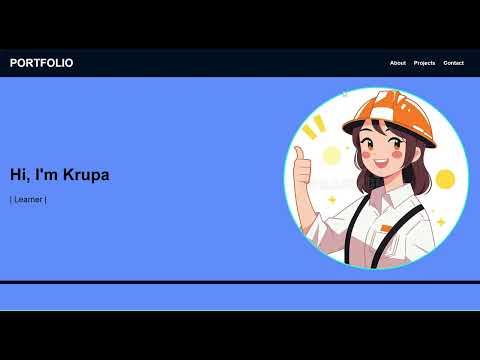
To access the code used for portfolio click this link
Task 8 : Writing Resource Article using Markdown
Objective - Markdown is an easy-to-use markup language that is used with plain text to add formatting elements(headings, bulleted this, URL's) to plain text without the use of a format of a format text editor or the use of HTML tags. Markdown is device agonostic and dispalys the writing format consistently across the device type. Write a technical resource article on a topic of your choice and post it on the MARVEL website . Refer to the linked article for further details .
Outcome -
Click here to view my resource article
To continue reading the report - Click here