Marvel Level-1
5 / 3 / 2026
Level 1:
Marvel !!!
TASK 1: Git Commands for Version Control
Basics:
1. Creating a Branch
git branchis used to create a new branch in the repository.- A branch allows developers to work on new features or experiments without affecting the main project.
2. Switching Between Branches
git checkoutchanges the working directory to the specified branch.- After switching, all commits and changes will belong to that branch.
3. Merging Branches
git mergeintegrates the changes from one branch into another branch.- When two branches have different commit histories, Git automatically creates a merge commit to combine them.
4. Rebasing
git rebaseis another method of integrating changes from one branch into another.- Instead of creating a merge commit, rebase moves the feature branch to start from the latest commit of the target branch, producing a cleaner linear history.
How Git Stores Data
Git does not record changes to files in a traditional manner like some version control systems.
Instead, Git uses a Content-Addressable Storage System, where each file and commit is stored based on a unique hash generated from its content.


TASK 3: Application on EC2 instance
For this task, a virtual machine was created using Amazon Elastic Compute Cloud (EC2) to deploy and run a Jenkins server for Continuous Integration and Continuous Deployment (CI/CD).
EC2 provides on-demand computing resources in the cloud, allowing users to launch and manage virtual machines without maintaining physical hardware. In this setup, Jenkins is installed on the EC2 instance to automate building, testing, and deployment of applications.
High Performance Networking in EC2
Standard network interfaces may not deliver sufficient performance for compute-intensive workloads such as Big Data processing, Machine Learning training, or High Performance Computing (HPC). AWS provides enhanced networking solutions to address this limitation.
Enhanced Networking (ENA)
Enhanced Networking using the Elastic Network Adapter (ENA) improves network throughput and reduces CPU overhead. It uses Single Root I/O Virtualization (SR-IOV) technology to provide high packet-per-second (PPS) performance and low latency, which is useful for network-intensive applications.
Elastic Fabric Adapter (EFA)
Elastic Fabric Adapter (EFA) is a specialized network interface designed for large-scale distributed computing workloads. It allows EC2 instances to communicate with each other with very low latency and high bandwidth, which is essential for applications such as scientific simulations, HPC workloads, and distributed machine learning systems.

.png?raw=true)
.png?raw=true)
TASK 2 & TASK 4: AWS CloudFront & Dynomo DB
Amazon DynamoDB
Amazon DynamoDB is a fully managed NoSQL database service provided by AWS. It is designed to handle large volumes of data while maintaining high speed and reliability.
Unlike traditional relational databases such as MySQL or PostgreSQL, which organize data into structured tables with fixed rows and columns, DynamoDB uses a flexible data model. This allows developers to store and retrieve large amounts of data with minimal latency.
Amazon CloudFront
Amazon CloudFront is a Content Delivery Network (CDN) service offered by AWS. Its main purpose is to deliver website content to users quickly and efficiently.
CloudFront works by storing cached copies of website content such as images, videos, JavaScript files, CSS, and HTML pages in multiple edge locations around the world. When a user requests the content, it is delivered from the nearest edge location instead of the original server.
.png?raw=true)
.png?raw=true)
TASK 5: KALI Linux -
Infrastructure as Code: The Live-Build Engine
Kali Linux is not installed in the same way as traditional operating systems like Windows. Instead, it is built and assembled using an automated system. The Kali development team uses a framework called live-build to construct the operating system.
The Build Pipeline
Rather than manually configuring every component of the system, developers define the entire operating system configuration inside a Git repository called live-build-config.
When a build process is triggered:
- The script downloads the Debian base system.
- Kali-specific configurations and packages are added on top of it.
- The build system then uses chroot (change root) to enter the build environment and install more than 600 security and penetration testing tools.
Metapackages
To manage the large number of security tools included in Kali Linux, the developers use Metapackages.
A metapackage is essentially an empty package that contains a list of dependencies rather than actual software. When a user installs a metapackage, it automatically installs all the tools listed within it.
Examples include:
kali-linux-top10– installs the most commonly used penetration testing tools.kali-linux-headless– installs tools suitable for server or non-GUI environments.
Social Engineering Attacks:

TASK 6: Socket.IO
Socket.IO Architecture
Socket.IO is not limited to just WebSockets. It acts as an additional communication layer that manages real-time connections between the client and server. This layer works on top of two important components that handle connectivity and message management.
Engine.IO
Engine.IO is the core communication engine used by Socket.IO to establish and maintain connections.
When a client connects:
- The system initially establishes a connection using HTTP Long Polling to ensure compatibility and reliability.
- After the connection is verified, it attempts to upgrade the connection to WebSockets for faster and more efficient real-time communication.
This fallback mechanism ensures that communication still works even in networks where WebSockets are restricted.
Packet Buffering
Socket.IO includes a packet buffering mechanism that improves reliability.
If a user's connection is temporarily interrupted (for example, due to poor network connectivity or moving through a tunnel), Socket.IO stores outgoing messages in a buffer. Once the connection is restored, the buffered messages are automatically transmitted to the client so that no important communication is lost.
Multiplexing (Namespaces and Rooms)
Socket.IO supports multiplexing, which allows multiple communication channels to operate over a single connection.
This is implemented using Namespaces and Rooms:
- Namespaces allow separation of different application features.
- Rooms allow grouping of users within a namespace.
For example, in a chat application, each room can represent a separate conversation group. Messages sent within a room are only delivered to users who are part of that room, ensuring that conversations remain isolated.

TASK 7: OSI
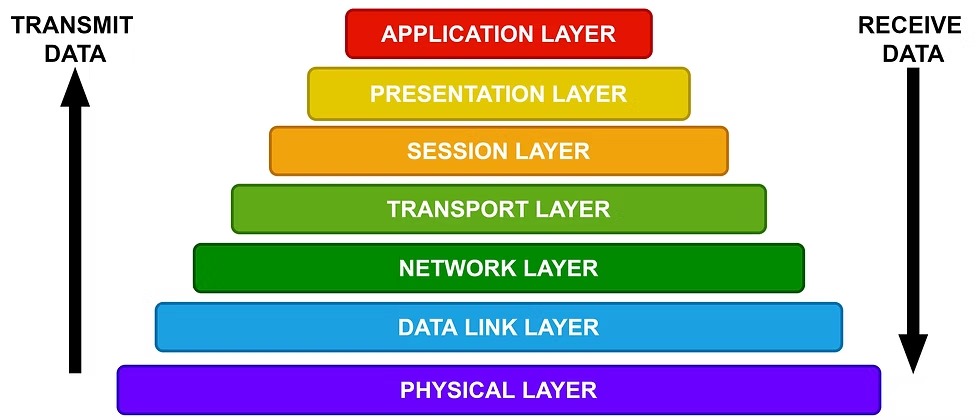
The Open Systems Interconnection (OSI) Reference Model is a conceptual framework used to understand how different computer systems communicate over a network. It provides a standard structure that allows devices and software from different vendors and operating systems to interact with each other. Because of this standardized model, communication is not restricted to a specific operating system or hardware platform. Systems built with different technologies can still exchange data effectively.
The Seven Layers of the OSI Model
- Physical Layer
Responsible for the transmission of raw bits over a physical medium such as cables, fiber optics, or wireless signals. - Data Link Layer
Ensures reliable data transfer between directly connected devices and handles error detection and correction. - Network Layer
Manages logical addressing and routing so that data packets can travel between different networks. - Transport Layer
Provides end-to-end communication, ensuring data is delivered completely and in the correct order. - Session Layer
Establishes, manages, and terminates communication sessions between applications. - Presentation Layer
Translates data into a format that the application layer can understand, and may handle encryption or compression. - Application Layer
The top layer that directly interacts with user applications and provides network services such as web browsing, email, and file transfer.
TASK 8: IaaS, PaaS and SaaS
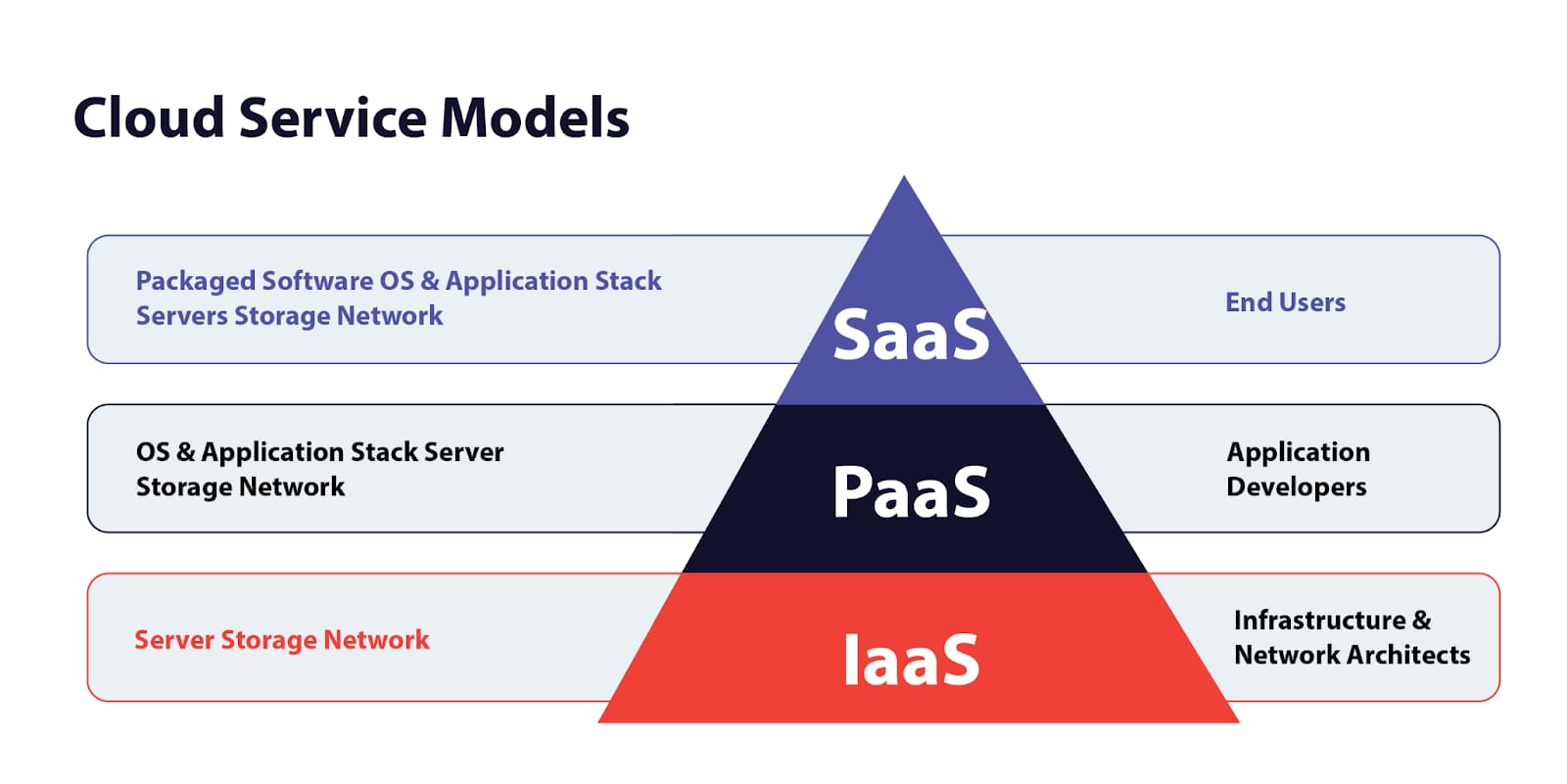
Infrastructure as a Service (IaaS)
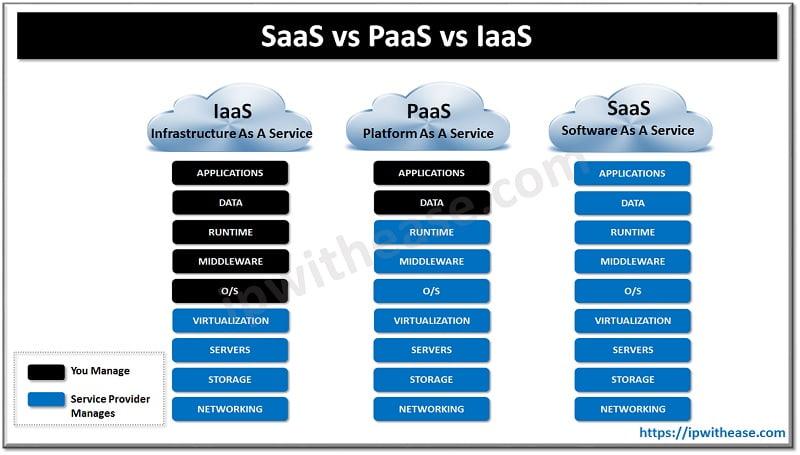
Provides virtualized computing resources like servers, storage, and networking Users have control over operating systems, applications, and storage. Examples: Amazon Web Services (AWS) EC2, Google Compute Engine, Microsoft Azure. Advantages:
Scalability: Easily scale up/down based on demand. Cost-Effective: Pay only for what you use. Full Control: You manage OS, storage, deployed apps, etc. No Hardware Maintenance: Infrastructure is managed by the provider. Disadvantages:
Management Complexity: Requires skilled personnel to manage and configure. Security: You're responsible for securing your own apps and data. Vendor Lock-in: Switching providers may be difficult. Applications:
Hosting websites or applications Storage, backup, and recovery High-performance computing (HPC) Development and testing environments
Platform as a Service (PaaS)
Delivers a platform that allows developers to build, test, and deploy applications without managing the underlying infrastructure. Examples: Google App Engine, Microsoft Azure App Service, Heroku. Advantages:
Speed: Quick development and deployment of apps. No OS Maintenance: Provider manages OS, runtime, and middleware. Built-in Tools: Database, DevOps, analytics, etc., are included. Disadvantages:
Limited Control: Less control over underlying infrastructure. Vendor Lock-in: Custom features may not be portable. Runtime Restrictions: Limited to languages and frameworks supported by the provider. Applications:
Software as a Service (SaaS)
Offers software applications over the internet on a subscription basis. Examples: Microsoft 365, Salesforce, Google Workspace. Advantages:
No Installation Needed: Access via browser or app. Automatic Updates: Always up-to-date. Accessibility: Accessible from anywhere with internet. Disadvantages:
Limited Customization: Can't tweak core functionality. Data Security: Sensitive data stored offsite. Dependency: You're at the mercy of the provider’s uptime and policies. Applications: Email, collaboration tools, CRM Document management Accounting and billing systems
TASK 9: Encrypted Messaging - Chat App
This application implements End-to-End Encryption (E2EE) to ensure that messages remain private and secure between users. The encryption process uses modern cryptographic techniques to protect both the confidentiality and integrity of transmitted data.
Key Derivation using PBKDF2
The system uses PBKDF2 (Password-Based Key Derivation Function 2) to transform a simple password into a strong encryption key.
- The function performs 100,000 hashing iterations to strengthen the password.
- This process produces a 256-bit cryptographic key suitable for secure encryption.
Encryption Algorithm: AES-256-GCM
The application uses AES-256-GCM, which is widely considered one of the most secure encryption standards available today.
- AES-256: A symmetric encryption algorithm used by governments, financial institutions, and secure communication systems.
- GCM (Galois/Counter Mode): A mode of operation that provides Authenticated Encryption, meaning it ensures both data confidentiality and integrity
Integrity Verification
GCM mode generates a cryptographic authentication tag along with the encrypted message.
- If an attacker modifies even a single bit of the encrypted data during transmission, the authentication tag will no longer match.
- In such cases, the
decryptMessagefunction will detect the tampering and reject the message instead of displaying corrupted data.
The Conclusion: This proves that without the exact derived key, the data is mathematically useless.
.png?raw=true)
.png?raw=true)
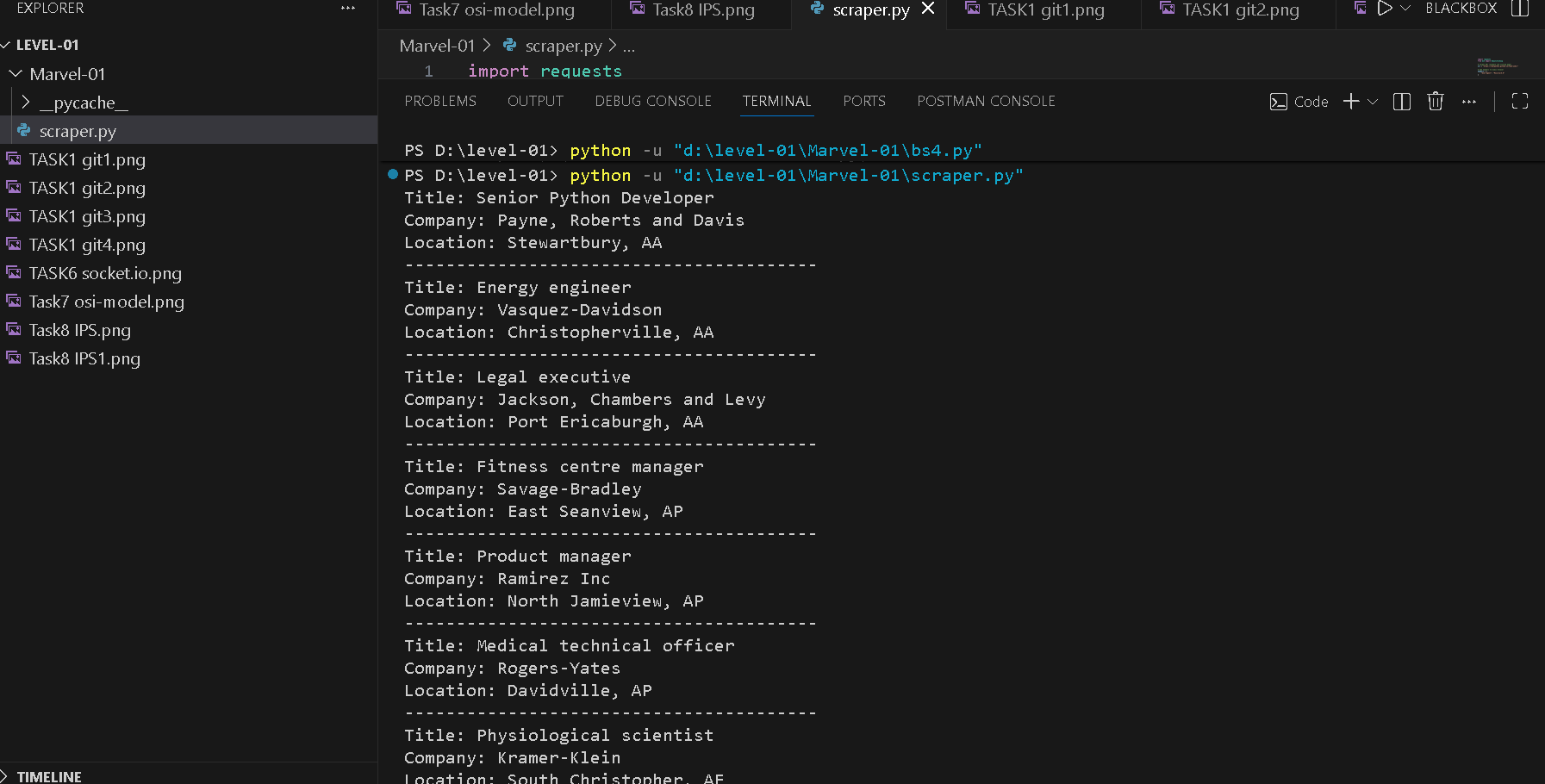
TASK 10: WEB SCRAPPING
Beautiful Soup is a Python library used for parsing and analyzing HTML and XML documents. It helps developers navigate and extract information from web pages in a simple and structured way. When HTML content is loaded into Beautiful Soup, it converts the document into a parse tree. This tree structure allows programmers to easily search, filter, and retrieve specific elements such as tags, attributes, or text content.