
PROJECT
CPU on FPGA
| Rishti Kulkarni | AUTHOR | ACTIVE |
| Sohan Aiyappa | COORDINATOR | ACTIVE |
CPU on FPGA: The NAND2Tetris Implementation
Link to Full Report Here – Check out the detailed technical report for a deep dive!
Introduction
This project focuses on creating a miniscule 16-bit computer on the Basys 3 Artix 7 FPGA. We adopted the NAND2Tetris architecture and implemented it using Verilog. The computer was constructed from first principles, starting with the universal NAND logic gate and building up to individual components like RAM, ROM, and the Processing Unit. Throughout the project, this bottom-up approach made learning the architecture and debugging the system much easier.
Working of the NAND2Tetris Computer
To understand how this computer works, we first need to look at the instructions it follows. The CPU handles two specific types of 16-bit instructions:
- A-Instruction (Address): This is used to set the A-Register. It usually holds a memory address or a constant value.
- C-Instruction (Compute): This tells the ALU (Arithmetic Logic Unit) what calculation to perform and where to store the result.
Hack CPU:

The computer consists of three major components:
- ROM (Instruction Memory): A Read-Only Memory that stores the list of instructions (the program).
- RAM (Data Memory): A writeable memory used to store data and variables.
- CPU (Central Processing Unit): The brain of the operation. It decodes instructions, executes them, and writes the results.
Inside the CPU, there are a few key players:
- ALU: Performs the math and logic operations.
- Program Counter (PC): Keeps track of which instruction line to run next.
- A-Register: Holds the address we want to access (like a pointer).
- D-Register: Holds the actual data values we are working with.
Specifications
- Architecture: 16-bit operands and 16-bit instructions.
- Display: Results are shown on 16 LEDs.
- Memory: 32k ROM (Instruction Memory) and 16k RAM (Data Memory).
- Speed: 100MHz operating speed in Auto Mode.
- Execution: Single-step execution with no pipelining implemented.
Implementation: Focusing on Usability
One of the main goals of my implementation was usability. To make testing and running programs easier, I designed the system to operate in two distinct modes.
1. Auto Mode
This mode executes the program automatically, fetching instructions one by one using the Program Counter.
- Why? Feeding instructions manually via switches is tedious for long programs. Auto mode allows complex code to run instantly.
- How it works: It uses the high-speed system clock. Since calculations happen in microseconds, we can't see the LEDs flashing in real-time. To solve this, the result of the computation is moved to a specific location (RAM[2]) so we can verify the output later.
2. Manual Mode
In this mode, instructions are fed manually, and we step through the program one click at a time.
- Why? This is perfect for debugging and seeing exactly how the computer is thinking at every step.
- How it works: Instead of the system clock, I implemented a Manual Clock button. Results are displayed immediately on the LEDs. Unlike Auto mode, the LEDs here display the value stored in the address pointed to by the A-Register. This makes it easy to check any memory location just by setting the address.
Logic Design & Block Diagram
Block Diagram of My Implementation:
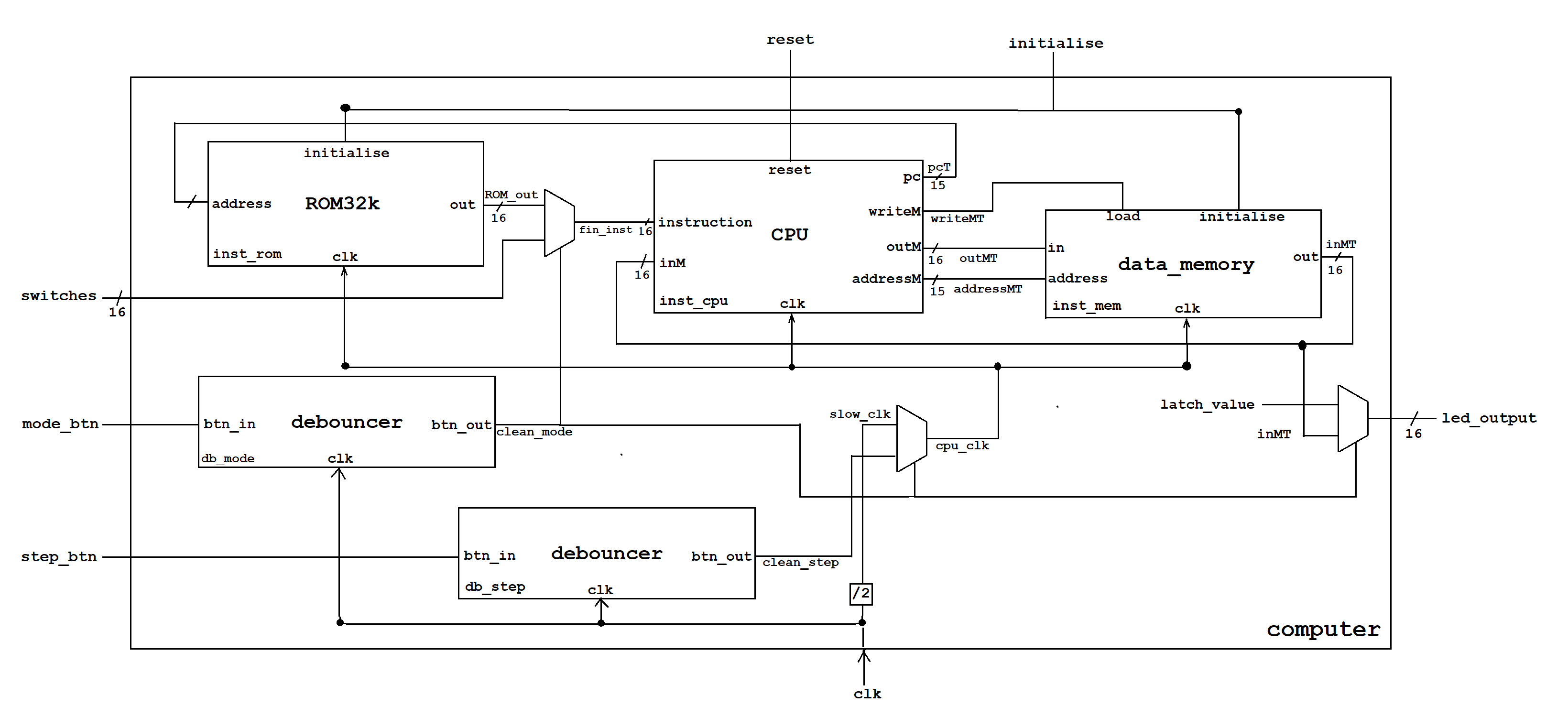
NAND2Tetris Block Diagram:
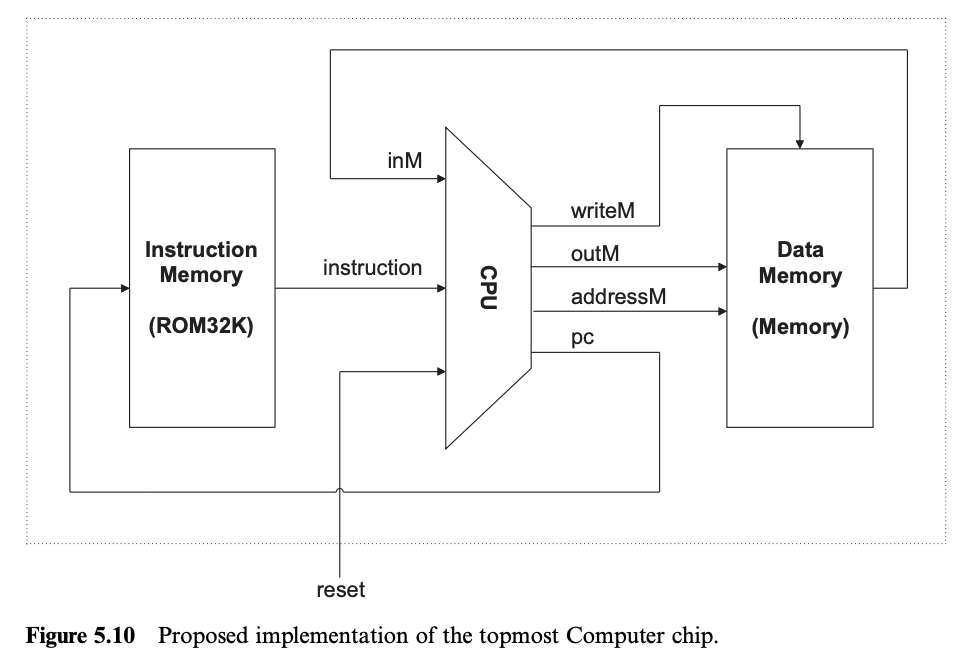
If you compare my final block diagram with the original NAND2Tetris architecture, you will notice some key additions needed to make this work on real hardware (the FPGA).
Since I needed to support both Auto and Manual modes, I couldn't just wire the clock directly.
- Multiplexers (Muxes): I added Muxes to switch between the fast system clock (for Auto) and the slow button-press clock (for Manual). You can see this logic in the bottom center of my diagram.
- Debouncers: Real physical buttons differ from simulations, they "bounce" or jitter when pressed. I added
debouncerblocks for themode_btnandstep_btnto ensure that one press equals exactly one signal. - Output Logic: Another Mux is used at the
led_outputstage to decide what to show on the LEDs based on which mode is currently active.
Input / Output Table
Here is a quick look at the signals used in the design, as seen in the block diagram:
| Signal Name | Direction | Description |
|---|---|---|
| clk | Input | The main 100MHz system clock from the FPGA. |
| switches [15:0] | Input | 16-bit input used for entering manual instructions. |
| mode_btn | Input | Button to toggle between Auto and Manual modes. |
| step_btn | Input | Button used as the clock pulse in Manual mode. |
| reset | Input | Resets the Program Counter (PC) to 0. |
| initialise | Input | Used to load the ROM with the program. |
| led_output [15:0] | Output | Displays the 16-bit result or memory value. |
Acknowledgements
I would like to keep this brief, but this project wouldn't have been possible without the support of some amazing people.
Huge thanks to UVCEGA and MARVEL (our student-run lab) for providing the platform and resources for innovation. I am deeply grateful to our Alumni Coordinator, Adrian P Isaac, for the opportunity and support.
I must thank Shimon Schocken and Noam Nisan, the creators of NAND2Tetris, for their exceptional course that served as my roadmap. Special thanks to my mentor, Anish Krishnakumar, for his patience and for helping me navigate the steep learning curve.
Thank you to my peers, A V Sohan Aiyappa and Virajit G P, for keeping me motivated with their dedication. And finally, a special thanks to my friend Priyamvada K C, whose encouragement pushed me to start this journey in the first place.