PROJECT
Raga
| Mahima Sudarshan | AUTHOR | ACTIVE |
| Varsha Shubhashri.M | COORDINATOR | ACTIVE |
RAGA — Abhyaas Buddy
A Detailed Project Report
Presented by: Mahima Format: Web application (React + Firebase)
1. Overview
RAGA (Abhyaas Buddy) is a web application that stands in for live human instrumentalists during the practice ("riyaz"/"abhyaas") sessions of Indian classical vocalists. Music, as the project frames it, is a blend of lyrics, notes, tunes, register, and rhythm — and in both the Hindustani and Carnatic traditions, vocalists are normally accompanied by instrumentalists on stage. RAGA recreates that accompaniment digitally, following the vocalist's shruti (pitch) and taal (rhythm) while layering on practice-tracking features such as drift detection, pitch detection, practice streaks, and gamification.
2. Background & Problem Statement
- Vocalists often don't get the chance to practice with instruments before a performance.
- The main blockers are availability of instrumentalists at the required practice hour and general logistics of coordinating people.
- Hindustani vocalists in particular need a tabla to hold the rhythmic framework (taal) steady while practicing.
- Taken together, vocalists need a reliable instrumental accompaniment for regular practice as well as before any performance or concert — which is the gap RAGA fills.
3. Objective
RAGA was scoped around two core objectives:
- Provide tanpura, tabla, and mrudanga accompaniment to intermediate–advanced Indian classical vocalists.
- Track practice sessions with light gamification on a daily basis, using features like pitch and drift detection to support "abhyaas" (practice) rounds.
4. Methodology — 3 Phases
The project was scoped and delivered across three phases:
| Phase | Scope |
|---|---|
| Phase 1 | Shruti & taal selector, tempo control, drift detection, practice-session control, and user accounts. Pitch detection was added as a bonus feature not originally scoped in the proposal. |
| Phase 2 | All 72 Melakarta ragas, gamification, and practice streaks. Violin, harmonium, full real-time tempo following, and a mobile app were listed as future scope in the original proposal. |
| Phase 3 | Gamaka following and a student–teacher interface, planned as future scope. |
5. Features — Phase 1
5.1 User Account
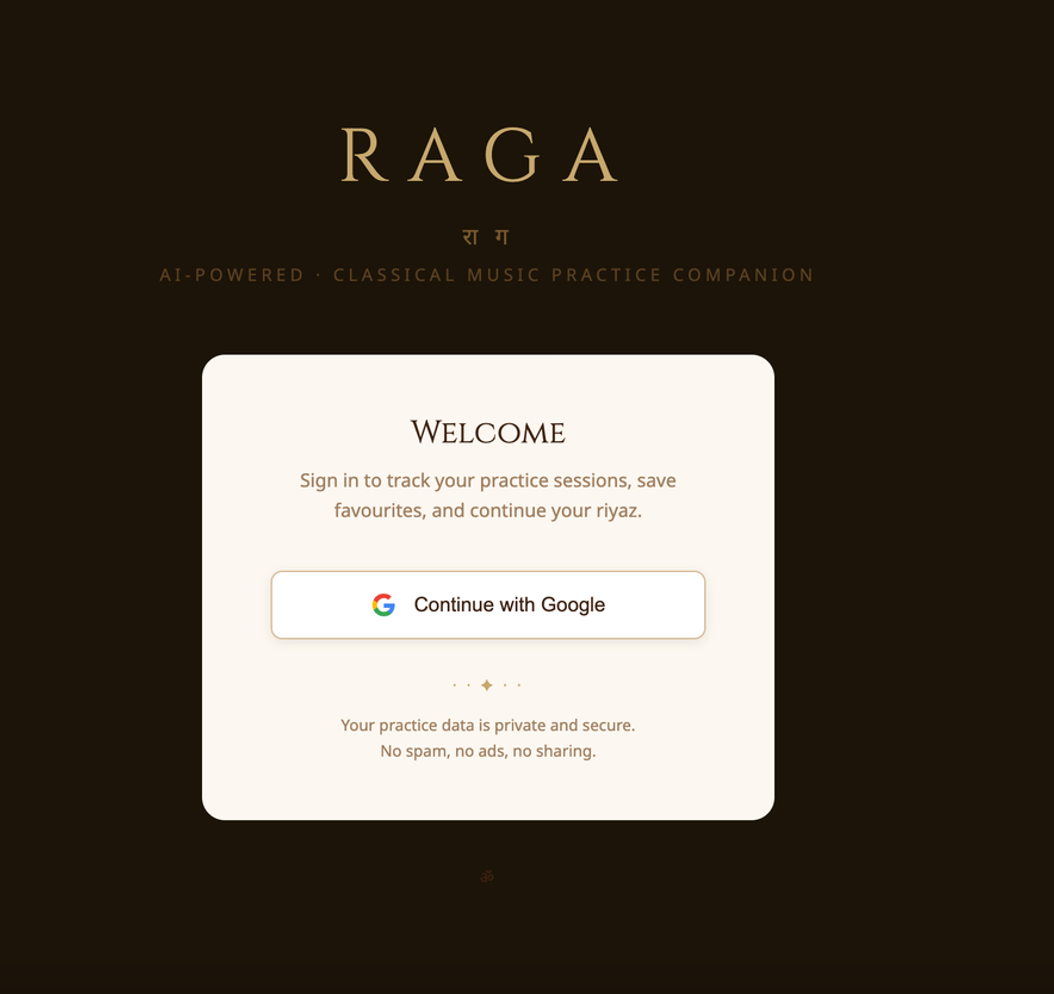
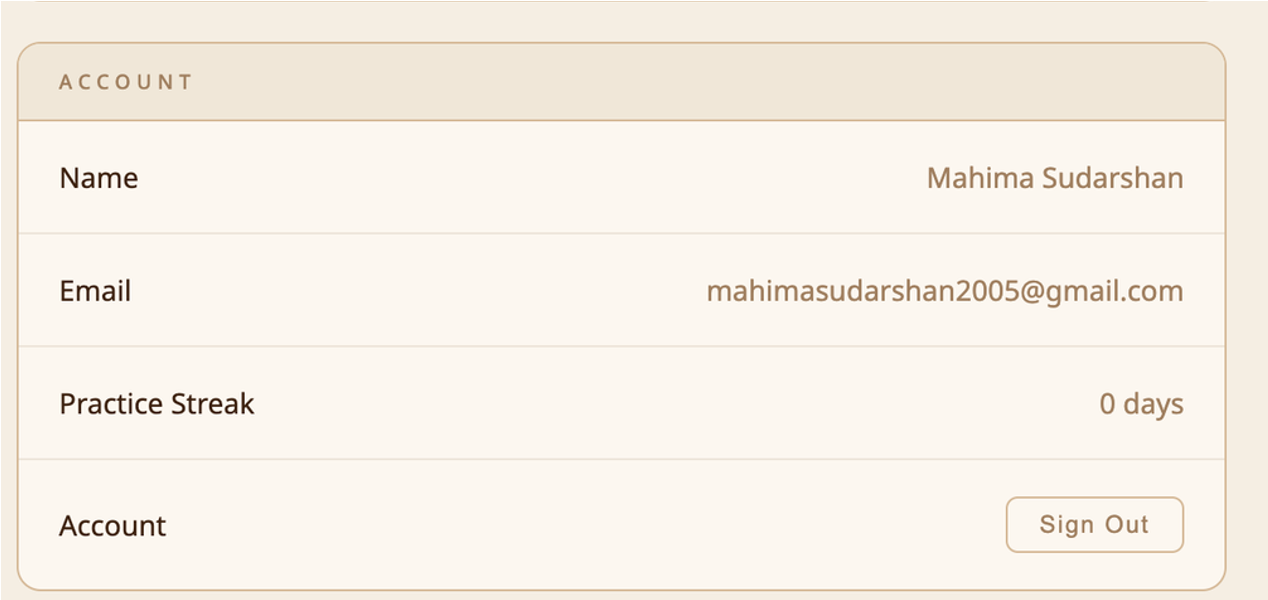
Google-based sign-in gates the app; a user's practice history, favourites, and settings are all tied to their account (backed by Firebase Authentication).
5.2 Shruti & Taal Selector + Practice Control
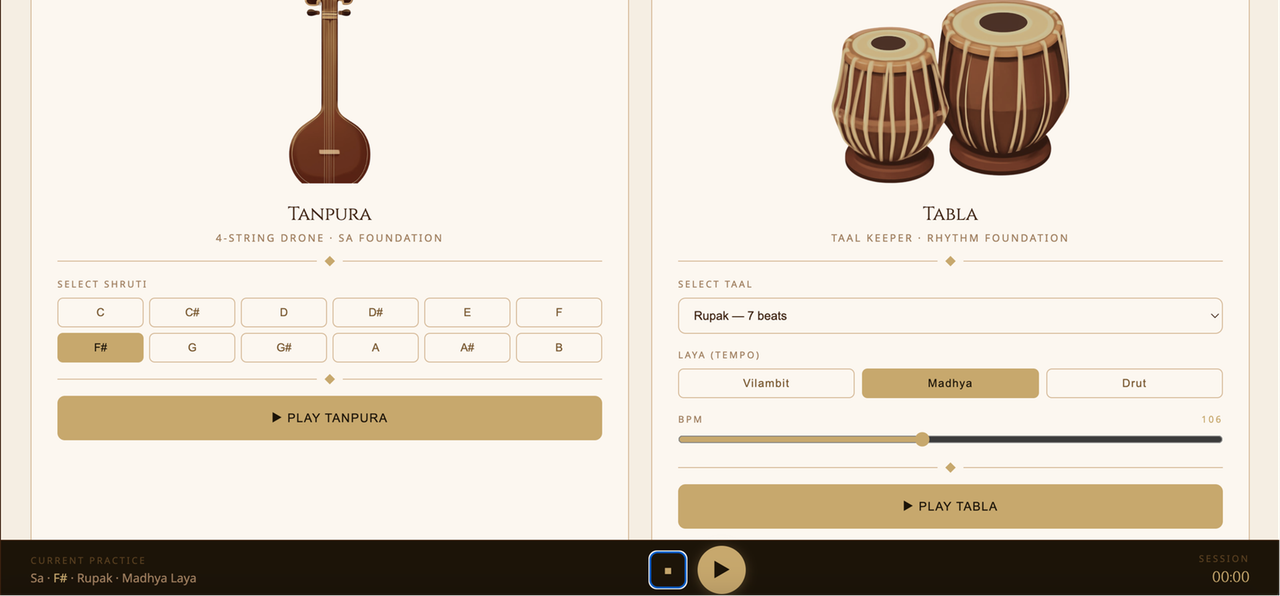
The main practice screen lets a vocalist pick their shruti (tonic/Sa, across all 12 semitones) and taal, and start/stop/pause a live session from a persistent bottom control bar. Ten seconds after the play button is clicked, the app starts to record the user's practice session, and as soon as the stop button is clicked the recording is automatically downloaded
5.3 Tempo Control
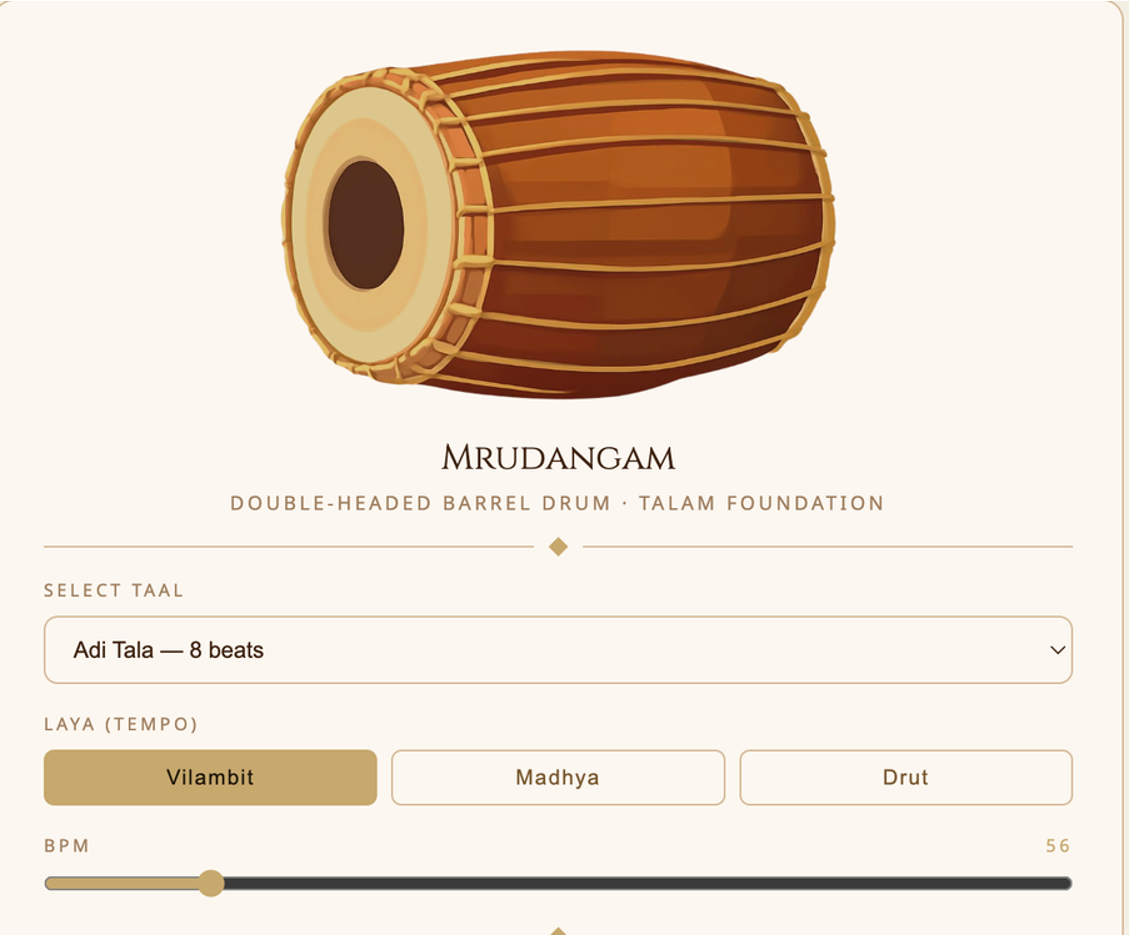
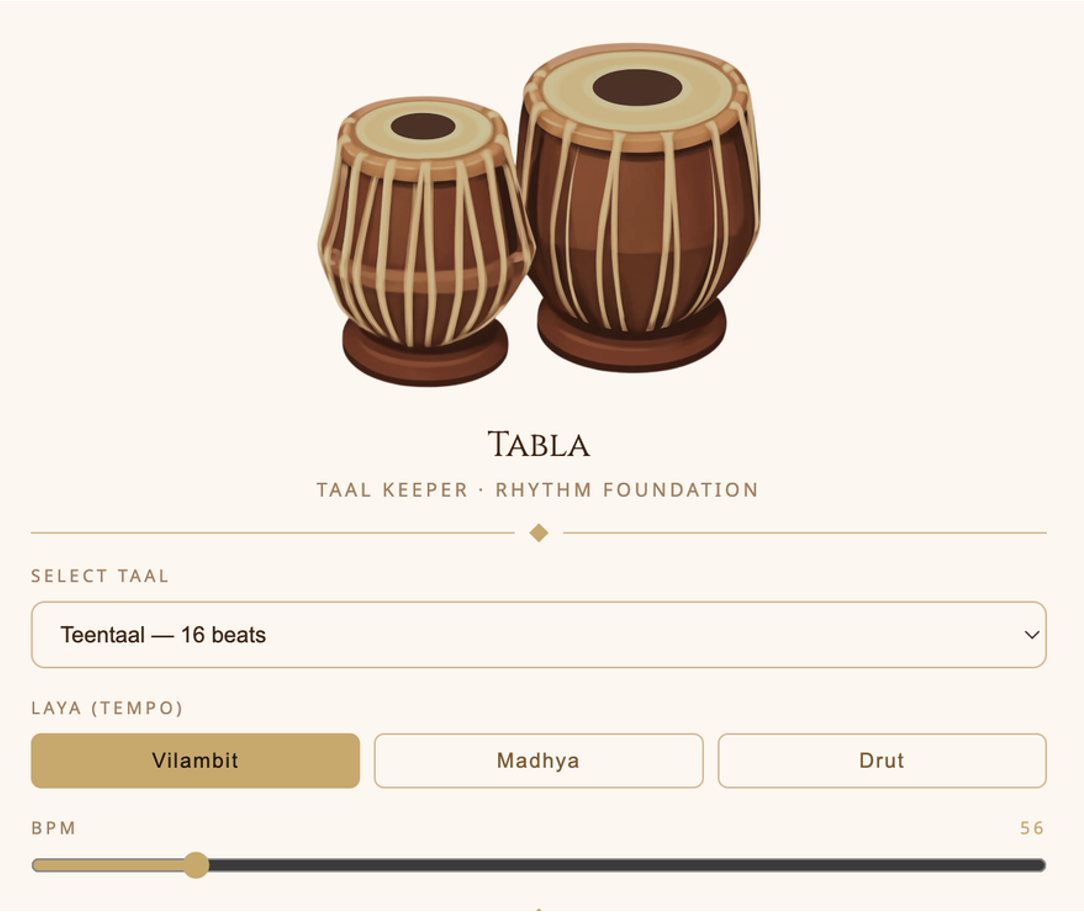
A Laya (tempo) selector — Vilambit (slow), Madhya (medium), Drut (fast) — plus a fine-grained BPM slider (30–200 BPM) drives the tabla/mrudangam playback rate.
5.4 Shruti & Taal Control (Tanpura + Tabla in session)
Once playing, the tanpura drone and the taal-keeping percussion (tabla for Hindustani, mrudangam for Carnatic) both play back pitch-shifted and tempo-shifted from a single recorded sample, in sync with the selected shruti and taal.
5.5 Practice History
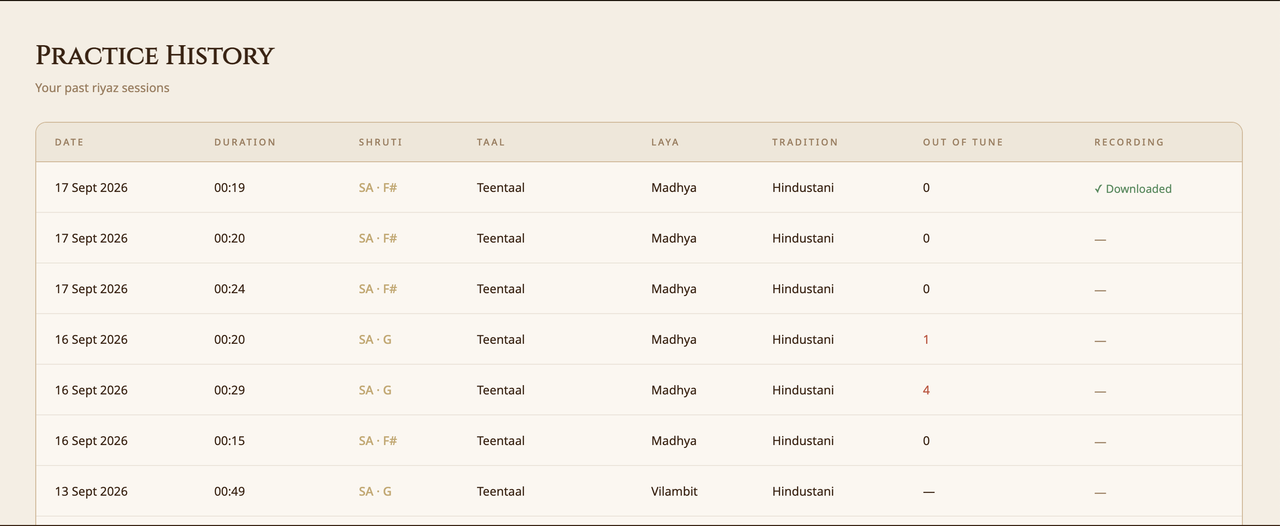
Every completed session (≥10 seconds) is logged to Firestore with its shruti, taal, laya, tradition, duration, and date, and surfaced in a sortable history table. This also displays the number of times the user went off tune, and indicates if the recording is downloaded.
5.6 Favourites
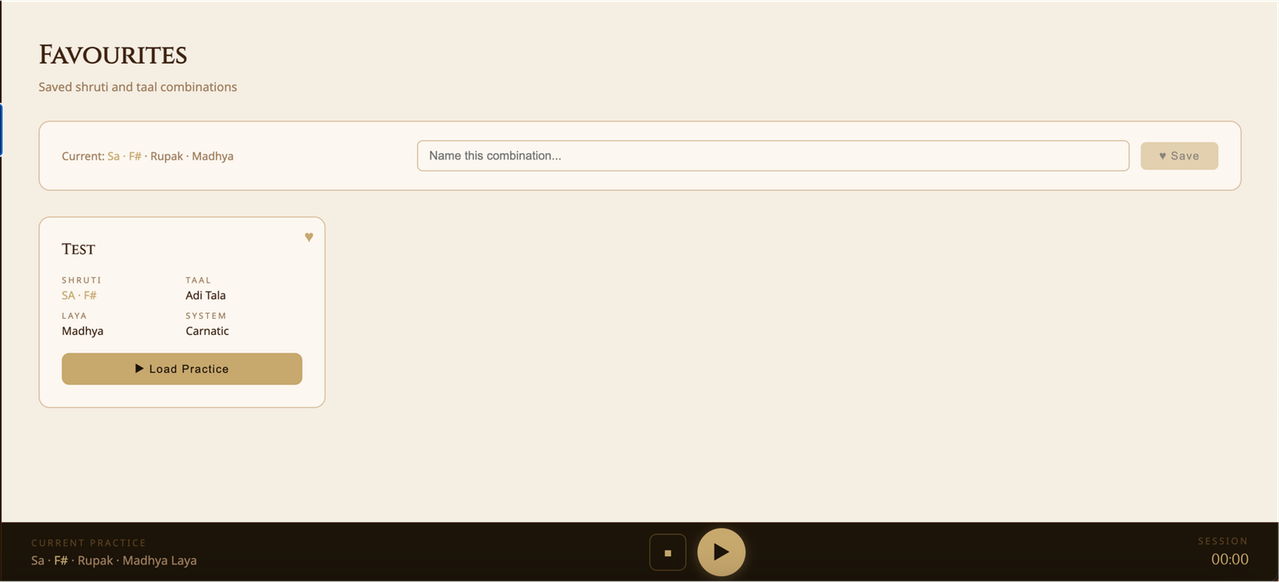
Users can save a named combination of shruti + taal + laya + tradition and reload it with one click for future sessions.
5.7 Drift Detection
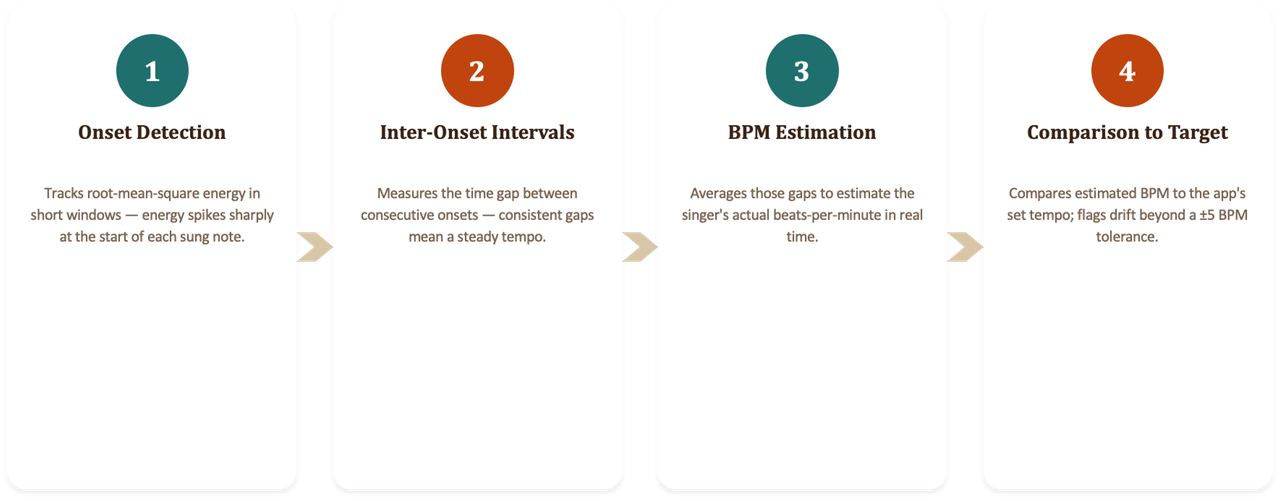
Drift detection listens to the vocalist's onsets via the microphone (RMS-energy-based onset detection), estimates their singing tempo from the intervals between onsets, and compares it against the current taal's BPM in four steps:
- Onset Detection
- Inter-Onset Intervals
- BPM Estimation
- Comparison to Target
If the vocalist drifts more than ~5 BPM from the target, RAGA nudges them to slow down or speed up.
5.8 Pitch Detection (YIN algorithm, ML-pretrained)
Pitch detection is built on the YIN algorithm, a well-known pitch/fundamental-frequency estimator, implemented in four stages:
- Difference Function
- Cumulative Mean Normalization
- Threshold Detection
- Parabolic Interpolation
with the core relationship:
frequency = sample rate ÷ period (in samples)
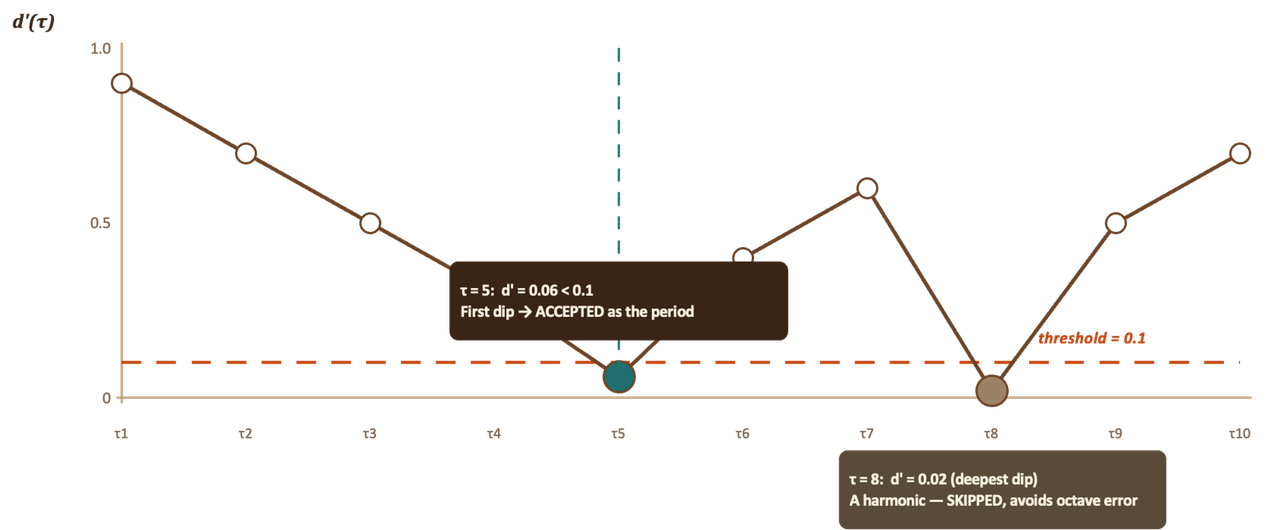
The detected frequency is converted to a semitone offset from the selected Sa, mapped to a swara name (Sa, Komal Ri, Chatushruti Ri, etc.), and — once a raga is selected — validated against that raga's arohana/avarohana to flag whether the sung note is actually "in raga."
6. Features — Phase 2
6.1 Practice Streak & Gamification
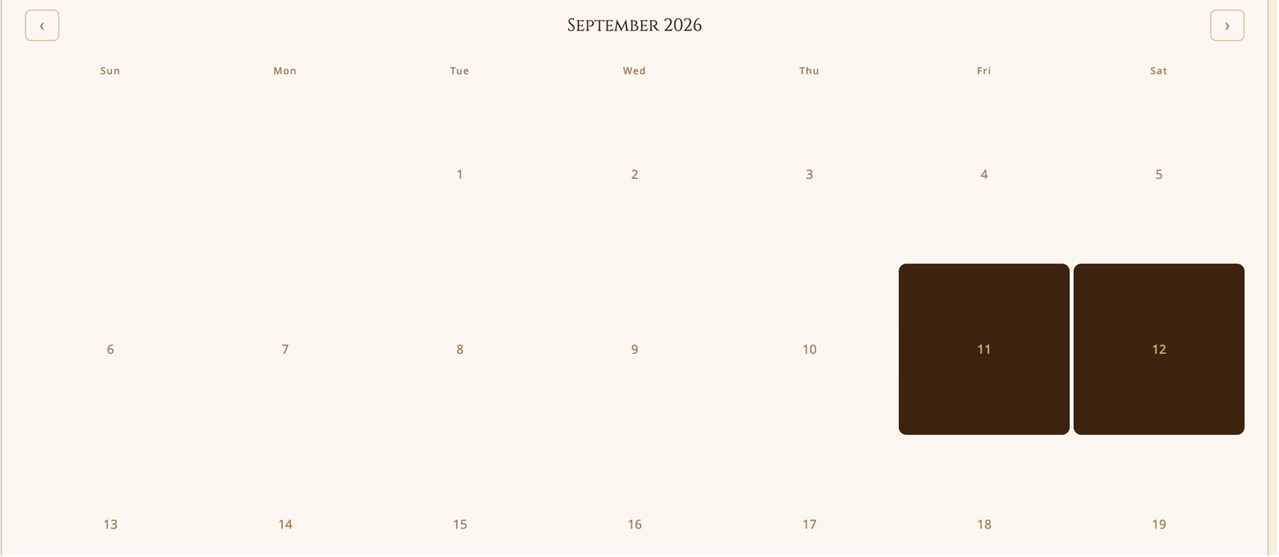
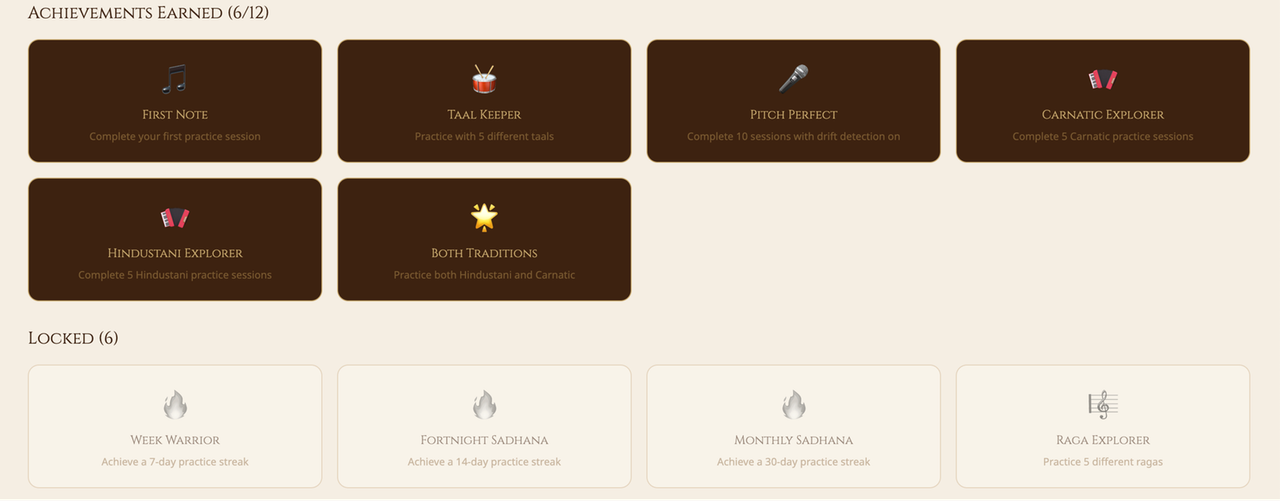
Beyond raw history, RAGA computes a practice streak, total sessions, longest session, and unique ragas/taals practiced, and awards 12 achievement badges (e.g., First Note, Week Warrior for a 7-day streak, Raga Explorer for 5 different ragas, Both Traditions for practicing Hindustani and Carnatic, and more) to gamify consistent abhyaas.

6.2 72 Melakarta Ragas — Katapayadi Chart
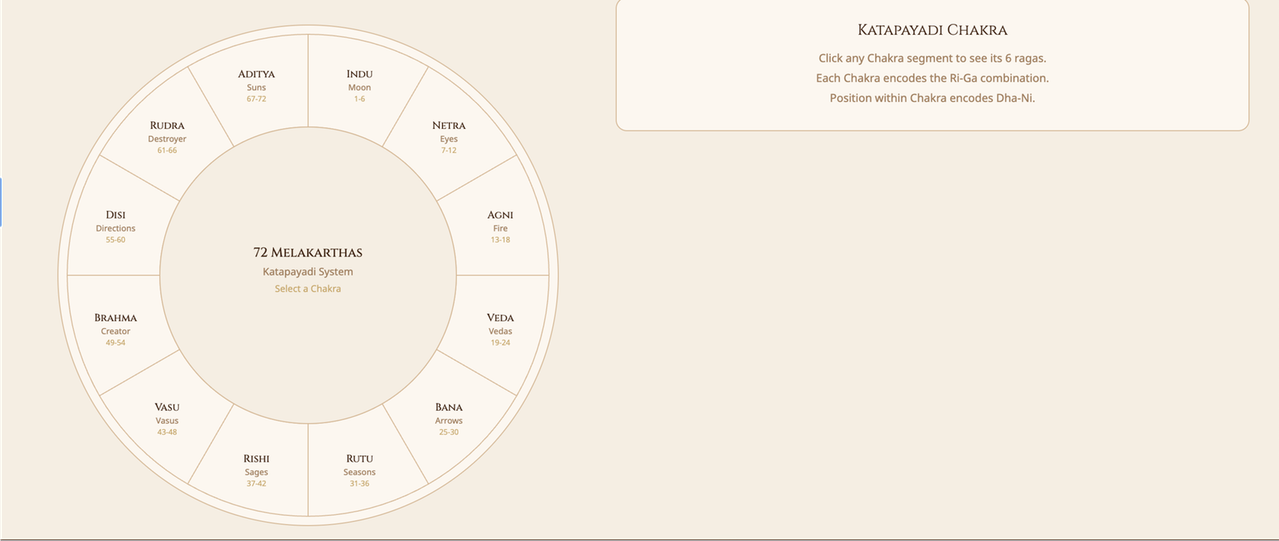
Phase 2 adds full coverage of Carnatic music's 72 Melakarta parent scales, browsable through an interactive Katapayadi chakra wheel — a 12-segment circular UI grouping the 72 ragas into their 12 traditional "chakras," each covering 6 ragas.
6.3 Katapayadi Algorithm
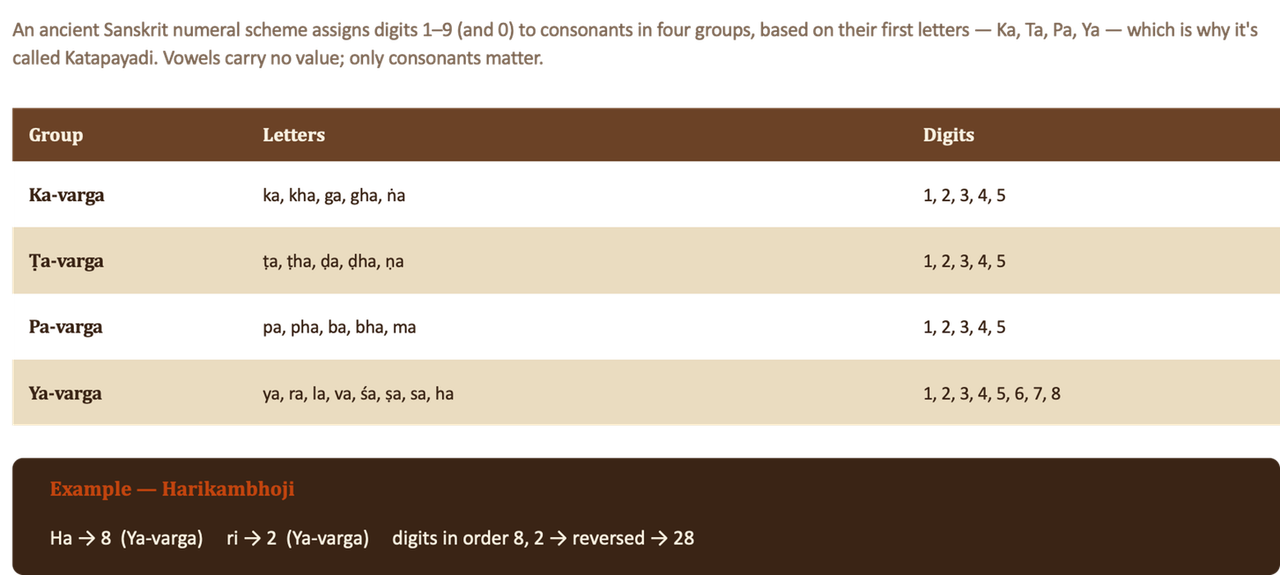
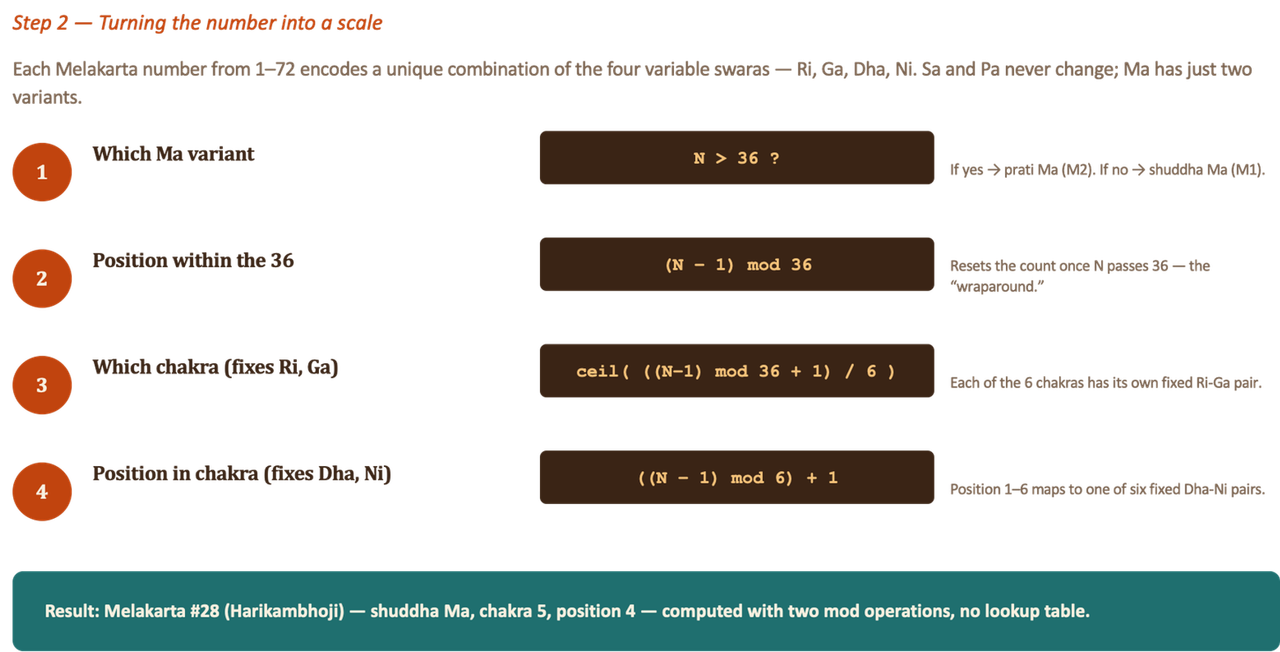
The Melakarta numbering-to-scale derivation follows the classical Katapayadi encoding: Ri–Ga combinations are keyed off which chakra a raga falls in (0–5), and Dha–Ni combinations off its position within that chakra (0–5); Madhyam (M1 vs M2) flips at raga 37. Selecting any raga surfaces its Arohana/Avarohana and individual swarasthana values.
7. Outcome of Phase 1
Phase 1 shipped a working end-to-end practice companion: tanpura + tabla/mrudangam accompaniment, shruti/taal/tempo controls, session tracking, favourites, and both drift and pitch detection — wrapped in a warm, classical-music-inspired UI.
---8. UX
The interface leans into an ornamental, classical-instrument-inspired visual language — deep browns and golds, Cinzel serif headings, diya/percussion motifs — applied consistently across login, practice, history, favourites, raga explorer, progress, and settings screens.
9. Future Scope
Phase 2 (planned in proposal, partly carried forward):
- Violin accompaniment
- Harmonium accompaniment
- Full real-time tempo following (rather than a manually set BPM)
- A dedicated mobile app
- Cloud storage for audio recording, with download as an option
Phase 3:
- Gamaka (ornamentation) following
- A student–teacher interface
10. Learnings
- Insight into the "hidden layer" of playing percussion instruments (the rhythmic/technical mechanics behind tabla and mrudangam playing).
- Exposure to Western classical music notation.
- Understood the logic behind drift detection.
- Learnt the algorithm behind pitch detection (YIN).
11. Credits
- Guru: Vid. N Sreemati Jayaram
- Tanpura: Vid. N Sreemati Jayaram
- Tabla: Shri Subir Nandi
- Mrudanga: Vidwan V Venkatasubbu
- Thanks to MARVEL for providing the platform to work on this project with regular follow-up.
12. Conclusion
- Successfully completed Phase 1 as scoped in the original project proposal.
- Additionally delivered several Phase 2 features (72 Melakarta ragas, gamification, streaks).
- Added an extra, originally-unscoped feature: real-time pitch detection.
- The web app is functional end-to-end and usable for real practice sessions with all current features.
13. Technical Notes (from the codebase)
The presentation describes what RAGA does; the underlying repository shows how it's built:
- Frontend: React 19 (Create React App /
react-scripts),react-router-domv7 for client-side routing across Practice, History, Favourites, Raga, Progress, and Settings screens. - Backend / data: Firebase — Firebase Authentication (Google sign-in) and Cloud Firestore for
Sessions,Favourites, and per-userSettingsdocuments. - Audio playback:
Tone.jsdrives tanpura and tabla/mrudangam sample playback, withplaybackRatecomputed on the fly to combine a pitch shift (semitone offset from the recorded sample's shruti) with a tempo shift (target BPM ÷ recorded sample BPM). - Drift detection: A custom
Web Audio API(AnalyserNode+ RMS energy) onset detector runs client-side, comparing the vocalist's estimated singing tempo against the selected taal's BPM. - Pitch detection: A hand-implemented YIN algorithm (difference function → cumulative mean normalization → threshold → parabolic interpolation) runs on live microphone input via the Web Audio API, converting detected frequency into a semitone offset and swara name;
@tensorflow/tfjsandaubiojsare present as project dependencies for future/experimental pitch-related work. - Music-theory data: A hand-authored
melakarta.jsmodule encodes all 72 Melakarta ragas with their Katapayadi chakra/position mapping, arohana/avarohana, and swarasthana logic;badges.jsencodes the 12 gamification badges and the streak/session statistics engine. - Design system: A consistent warm brown/gold palette,
Cinzel(headings) +Noto Sans(body) typography, and ornamental section dividers throughout the UI.
14. Links
- GitHub Repository: MahimaSudarshan/Raga
- Deployed App: Raga Web App
- Project ppt