
Level 1
13 / 10 / 2026
Task 1:-LTspice and KiCad
Objective
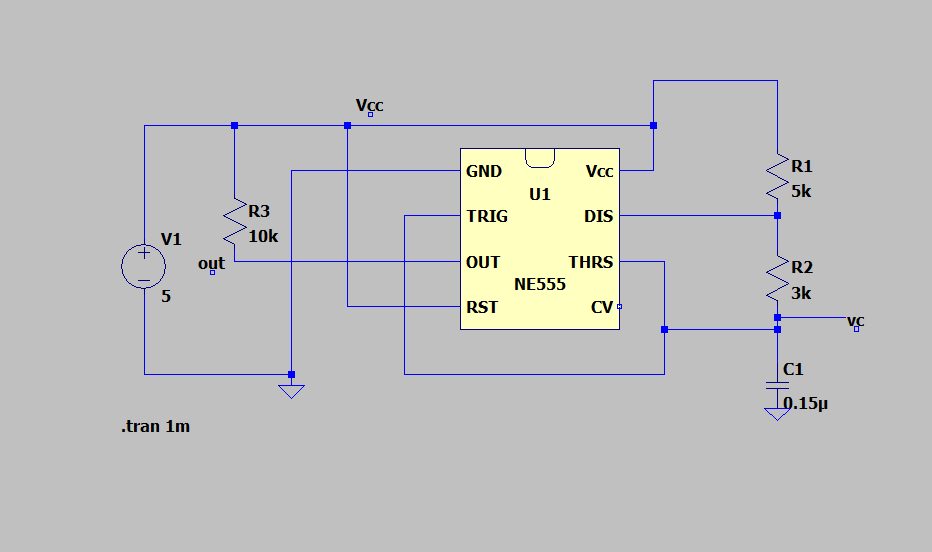
Design and simulate a 555 timer-based astable multivibrator using LTspice. Learn working with LTspice and KiCad.
General Working
- Configured the 555 timer using two resistors and a capacitor to continuously flip between HIGH and LOW output without needing an external trigger.
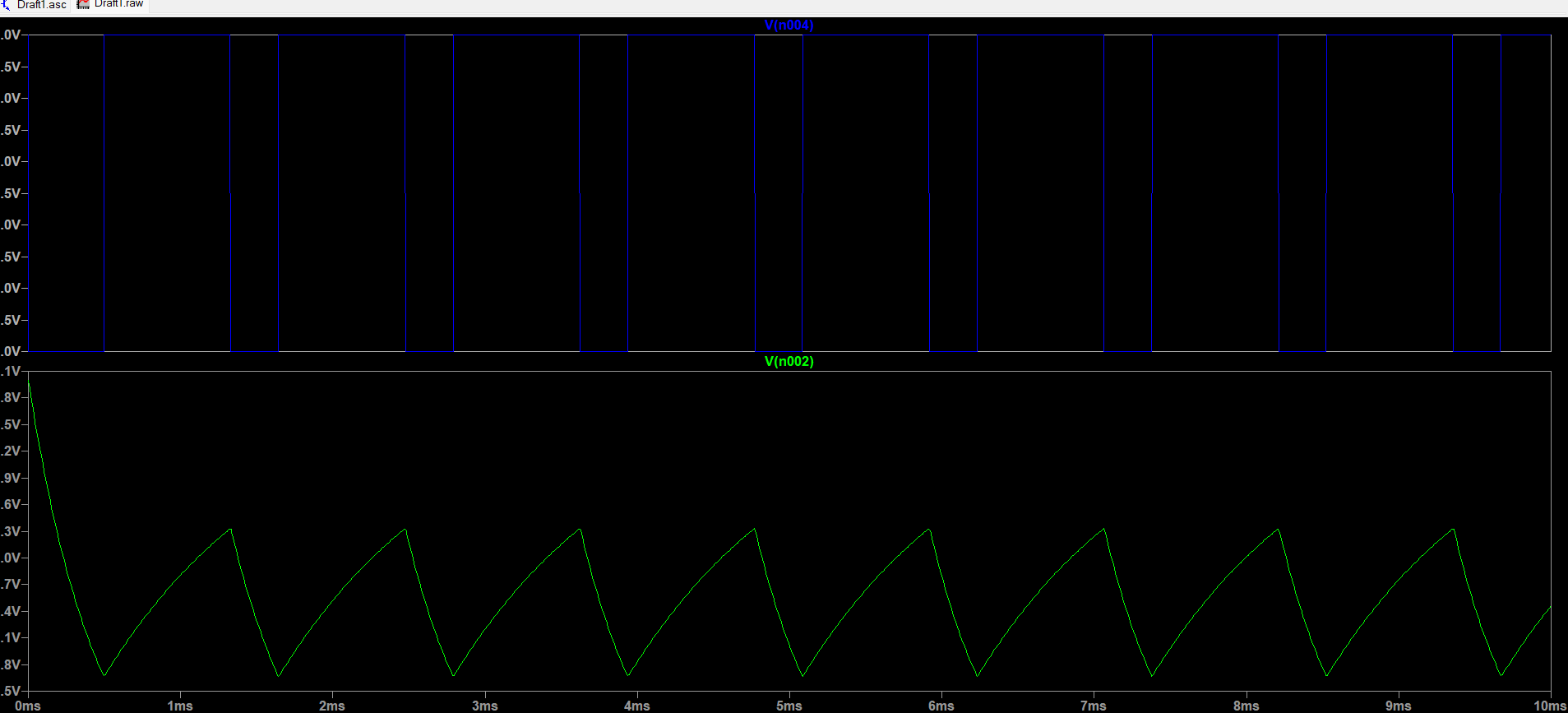
- Ran a time-domain simulation to observe the square output wave and charging/discharging curves of the timing capacitor.
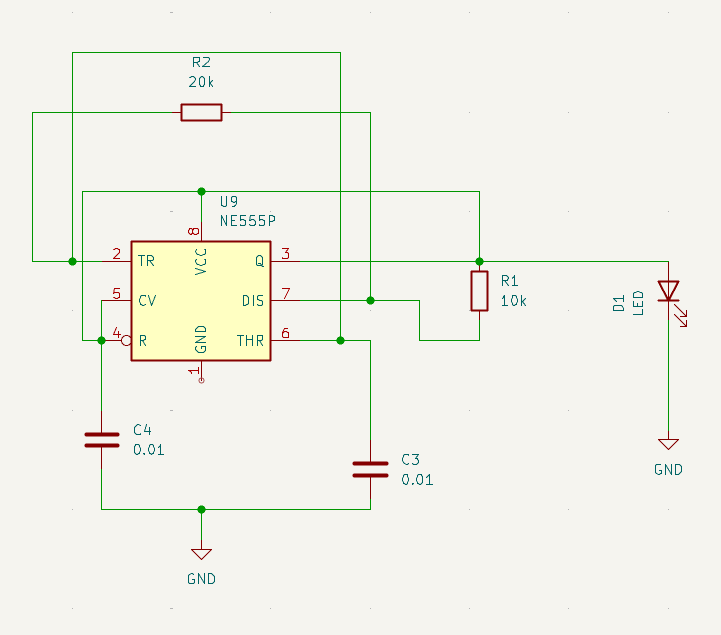
- Drew the circuit diagram using standard symbols, connecting the 555 timer, passive components, and an LED indicator with nets.
- Got hands-on experience on circuit stimulating while working on this task while placing parts logically, running copper traces without short circuits, and setting up a clean layout ready for manufacturing.
Circuit diagram on LTspice
Graph images
Circuit image on KiCad
Task 2:-Point Turn of a Vehicle with Ultrasonic Sensor
Objective
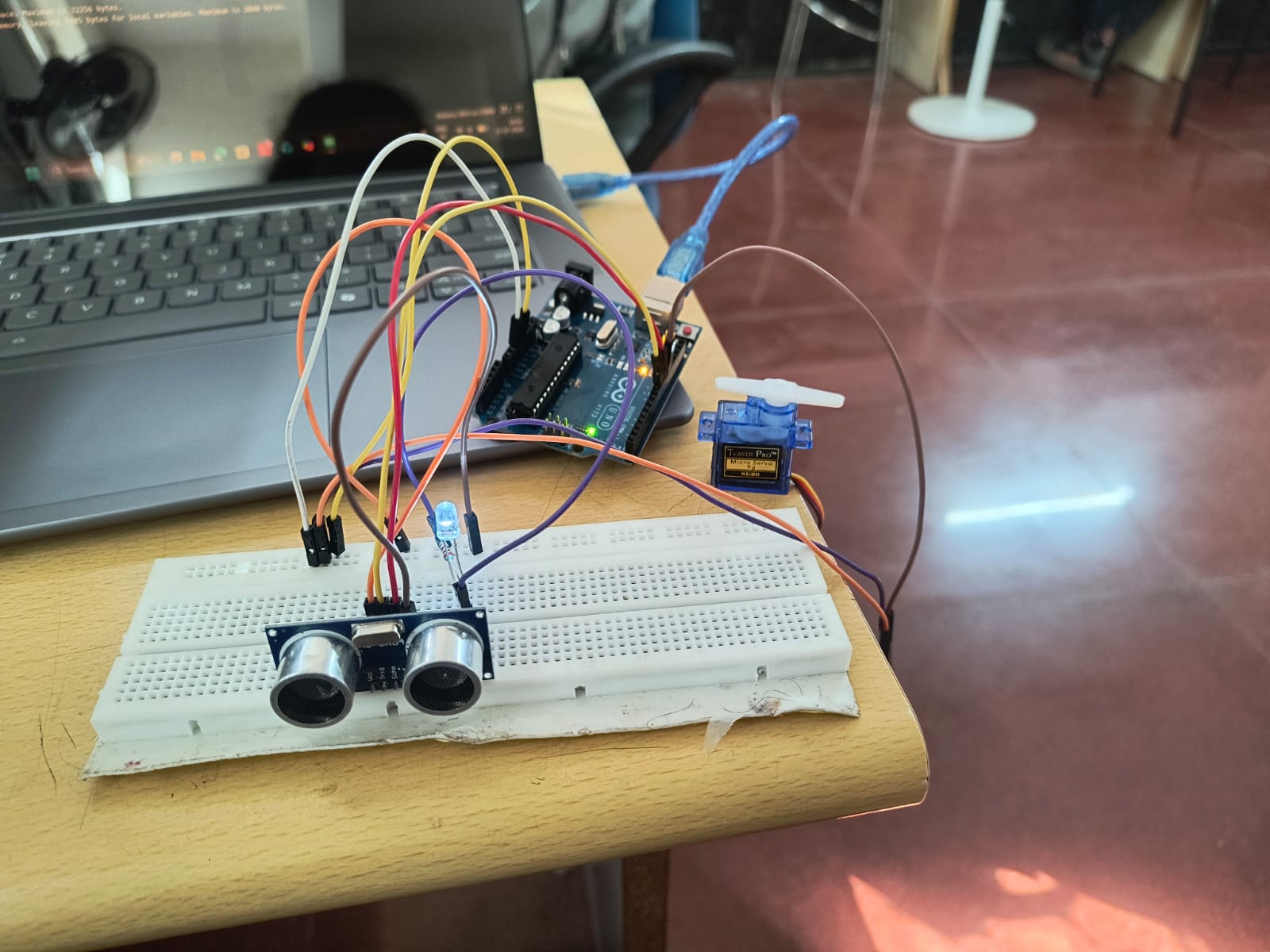
Detect objects in front of the vehicle using a HC-SR04 ultrasonic sensor and spin in place to steer away from the obstacle using a servo.
Key features and Working
- Turning of the servo motor upon detecting the object. This mechanism is initiated by the ultrasonic sensor.
- HC-SR04 sensor sends out a high-frequency sound via the Trig pin and waits for the sound to bounce off an object and return to the Echo pin.
- Using the time taken for the echo to return and the speed of sound, the Arduino calculates the distance between the sensor and the obstacle.
- if the distance betwwen obstacle and the sensor is less then the servor motor turns as response to the short distance between the obstacle and the sensor.

Task 3:-Temperature and Humidity Detection
Objective
The goal of this task was to read temperature and humidity levels from the surrounding air using a DHT11 digital sensor and display the live readings on the Arduino Serial Monitor.
Key features and Working
- DHT11 is a Digital Sensor which measures ambient room temperature and air humidity
- It combines these measurements and converts them into a digital signal.
- These digital signals are analysed and processed by the arduino and thus provides us with output on the serial monitor based on this data
- The DHT11 is relatively slow it can only update readings once every 1 to 2 seconds.
Circuit connections

Serial monitor readings
.jpeg?raw=true)
Task 5:- Battery Capacity Measurement
Objective
Monitor the voltage of a Li-ion battery using analog input on Arduino. Use a MOSFET as a switch to disconnect the load when voltage drops below a safe threshold.
Key Features and Working
- Monitors a Li-ion cell's voltage using an Arduino analog input, scaled through a voltage divider.
- A logic-level MOSFET acts as a switch between the battery and the load.
- Arduino reads the voltage with analogRead() and converts it to volts.
- While voltage stays above the cutoff ( 3.0 V), the MOSFET gate is HIGH and the load discharges the cell.
- Discharge current (V/R) is accumulated over time to calculate capacity in mAh.
- When voltage drops below the threshold, the gate goes LOW and the MOSFET disconnects the load.
- This demonstrates battery protection through voltage monitoring and switching, preventing over-discharge.
Circuit connections

Serial monitor readings

Task 6 - Battery Charging
Objective
To build a solar-powered lithium-ion battery charger using 18650 cells.
Key features and Working
- Solar panels convert sunlight into direct current (DC) electricity.
- However, solar output fluctuates constantly due to channges in sunlight intensity because of weather, sunlight angle and shadows. Also Lithium-ion batteries (like 18650 cells) are sensitive to voltage variations and overcharging.
- To overcome this problem, a solar charge controller module is connected between the solar panel and the 18650 battery.
- This module regulates the fluctuating solar input into a stable Constant Current / Constant Voltage source preventing overcharging, over-discharging, and night-time power drain back into the panel.
Circuit image

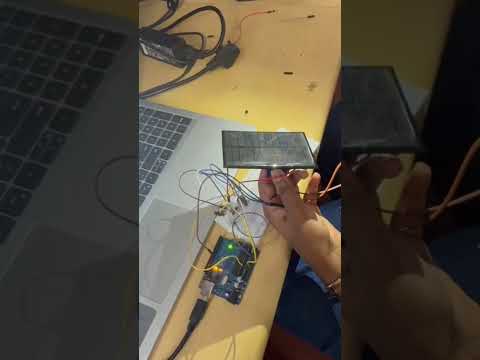
Task 7 :- Solar Tracker
Objective
Use LDRs and a servo motor controlled by Arduino to orient a solar panel toward the strongest light source. The system maximizes solar energy collection using dual LDR comparison logic and basic actuator control.
Key Features and Working
- Uses two LDRs mounted on opposite sides of the solar panel to sense light intensity from either direction.
- Each LDR is read through an Arduino analog input, typically wired in a voltage divider with a fixed resistor.
- A servo motor, driven by a PWM pin, rotates the panel to change its orientation.
- Arduino compares the two LDR readings; if one side receives more light, the servo turns the panel toward that side.
- When both readings are nearly equal (within a small tolerance), the servo holds its position, so the panel faces the light source and avoids jitter.
- Servo angle limits (e.g., 0-180°) keep the movement within safe bounds.
- This maximizes solar energy collection through simple dual-LDR comparison logic and basic actuator control.
Task 8 - Simple Electric Circuits Simulation on MATLAB
Objective
Learn the basics of Simulink in MATLAB by designing a simple RLC or transistor-based circuit. Simulate voltage, current, and frequency responses over time using virtual probes.
key features and working
- Setup: Series RLC circuit built in Simulink (R = 10 Ω, L = 10 mH, C = 100 µF, 10 V peak source, 159 Hz). A current sensor was placed in series, and voltage sensors across the source and the capacitor. Their outputs went through PS-Simulink Converters to the scope.
- Resonance: f₀ = 159.15 Hz. At resonance X_L = X_C, so Z = R.
- Current: Peak of about 1 A (10 V / 10 Ω), in phase with the source voltage, so the circuit behaves as a purely resistive load.
- Capacitor voltage: Peak of about 10 V (Q × 10 V), lagging the current by about 90° (roughly 1.5 ms).
- Transient: In the first cycle the current peaked at only about 0.5 A and the capacitor voltage at about 8.6 V. It settled into steady state after one or two cycles, as expected for ζ = 0.5.
- Away from resonance: Impedance rises and the current falls. Below f₀ (e.g. 50 Hz) the circuit is capacitive and the current leads. Above f₀ (e.g. 1000 Hz) it is inductive and the current lags. Run these two frequencies on your model to confirm before submitting.
- Conclusion: The simulated waveforms matched the theoretical resonant frequency, current, capacitor voltage and phase relationships, showing that Simulink sensors and scopes can analyse circuit behaviour without a physical setup.


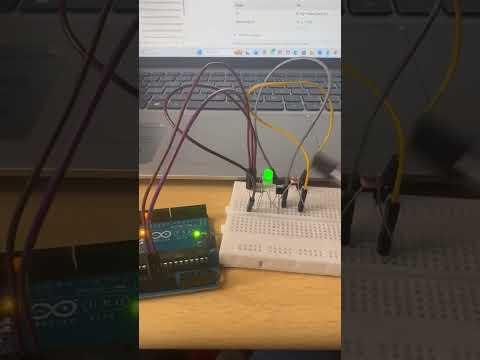
Task 10 :- Auto Night Lamp Using LED for Electric Vehicles
Objective
Design a light-sensitive LED circuit using an LDR and a BJT transistor. The LED turns on when light levels drop, simulating an automatic headlamp system for EVs.
Key Features and Working
- Uses an LDR as the light sensor, with its resistance dropping in bright light and rising in darkness.
- The LDR is connected in a voltage divider with a fixed resistor (or potentiometer for sensitivity adjustment) to set the transistor's base voltage.
- A BJT (e.g., BC547/NPN) acts as the switch, driving the LED with a current-limiting resistor.
- In daylight, the LDR resistance is low, so the base voltage stays too low to turn the transistor on, and the LED remains OFF.
- In darkness, the LDR resistance rises, the base voltage increases, the transistor saturates, and the LED turns ON, simulating an automatic EV headlamp.
- Shining a mobile flashlight on the LDR turns the LED OFF, and covering or removing the light turns it back ON, which demonstrates the testing method.
- No microcontroller is needed, so the circuit is simple, low-cost, and works automatically without manual switching.
Task 11:- Buck converter
Objective
To design and simulate a Step-Down DC-DC Converter operating in Continuous Conduction Mode using LTspice, verifying output voltage and inductor current characteristics against simulated waveforms.
Key Features and working
- This is achieved by designing and stimulating a DC-DC Buck Converter in LTspice. By turning an electronic switch (MOSFET) ON and OFF at a high speed with duty cycle equal to 0.4s, the circuit pulses the 50V input.
- An inductor and capacitor filter network then smooths out this pulseded signal, delivering a steady 20V output across a 20 ohm load resistor.
- The buck converter works by repeatedly switching between two main operational states, 20,000 times per second.
- current constantly flows through the circuit and never drops to zero, ensuring a stable power supply to the load.
Circuit and graph image

Inductor graph image

Voltage graph image

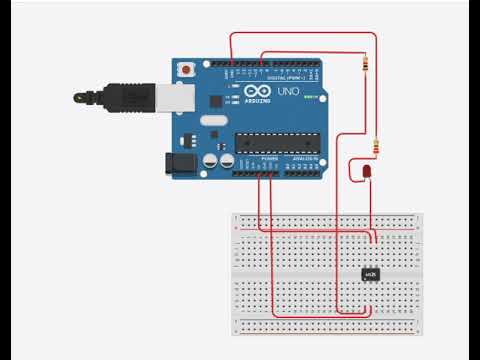
Task 12:- Wireless Charger Simulation on Tinkercad
Objective
Wirelessly send electrical energy from a transmitter circuit to a receiver circuit without physical wire connections.
Key features and Working
- Electromagnetic induction - an alternating current in the first coil creates a magnetic field, which induces a current in the second coil nearby.
- An LED on the receiver side that lights up when power transfers wirelessly.
- The transmitter converts DC power from the Arduino into a high-frequency alternating signal (PWM) and feeds it into an LC circuit (inductor + capacitor). This produces an oscillating magnetic field around the transmitter coil.
- The reciever Placed nearby, the receiver coil catches the magnetic field. This field generates (induces) an electric current, powering the connected LED.
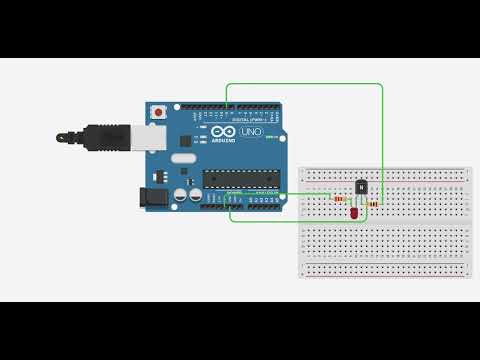
Task 13 :- Utilizing Transistors as Switches and Voltage Regulators
Objectives
Understand how transistors can be used as digital switches and basic voltage regulators.
Key features and working
- A transistor (like BC547) has three terminals: base, collector, and emitter. A small current at the base controls a larger current between the collector and emitter.
- Used as a switch, the transistor has two states: cut-off (OFF, no current flows) and saturation (fully ON, current flows freely). An Arduino digital pin (HIGH/LOW) can easily drive it.
- A base resistor (about 1 kΩ) is essential to limit the base current and protect the Arduino pin and the transistor.
- Transistors let a low-power Arduino pin control high-power loads like LEDs, motors, and relays, which the pin cannot drive directly.
- A transistor is not a perfect switch. It drops about 0.7V across base-emitter and about 0.2V across collector-emitter when ON, so the LED receives slightly less voltage, as seen in the Tinkercad simulation.
- In its active region, the transistor acts like a variable resistor and can regulate voltage, but it wastes the extra power as heat.
- Fast ON/OFF switching of a transistor is the core principle of a buck converter, which steps down voltage efficiently with very little heat loss.

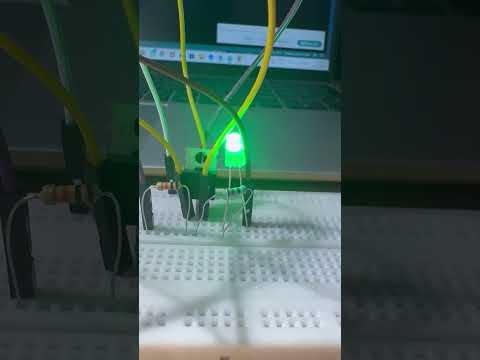
Task 14 :- LED Brightness Control Using PWM and MOSFET
Objective
To understand how an N-channel MOSFET works as a switch and how varying the PWM duty cycle from an Arduino controls LED brightness while delivering power efficiently.
Key Features and Working
- Uses an Arduino PWM pin to drive the gate of an N-channel logic-level MOSFET, with a series resistor on the gate and a pull-down resistor to keep it OFF at startup.
- The LED, with a current-limiting resistor, is connected between the supply and the MOSFET drain, while the source goes to ground, so the MOSFET works as a low-side switch.
- When the gate voltage exceeds the threshold, the MOSFET turns ON and current flows from drain to source through the LED. When the gate is LOW, it turns OFF and the LED goes dark.
- PWM Duty cycle is varied , which switches the MOSFET ON and OFF rapidly, far faster than the eye can notice.
- A higher duty cycle keeps the LED ON for a larger fraction of each cycle, so the average power and brightness increase. A lower duty cycle gives a dimmer output.
- A potentiometer on an analog pin can be used to adjust the duty cycle manually and demonstrate smooth dimming.
- Because the MOSFET operates fully ON or fully OFF, power loss is minimal, which makes PWM with a MOSFET an efficient way to control power delivery.
Click here to continue